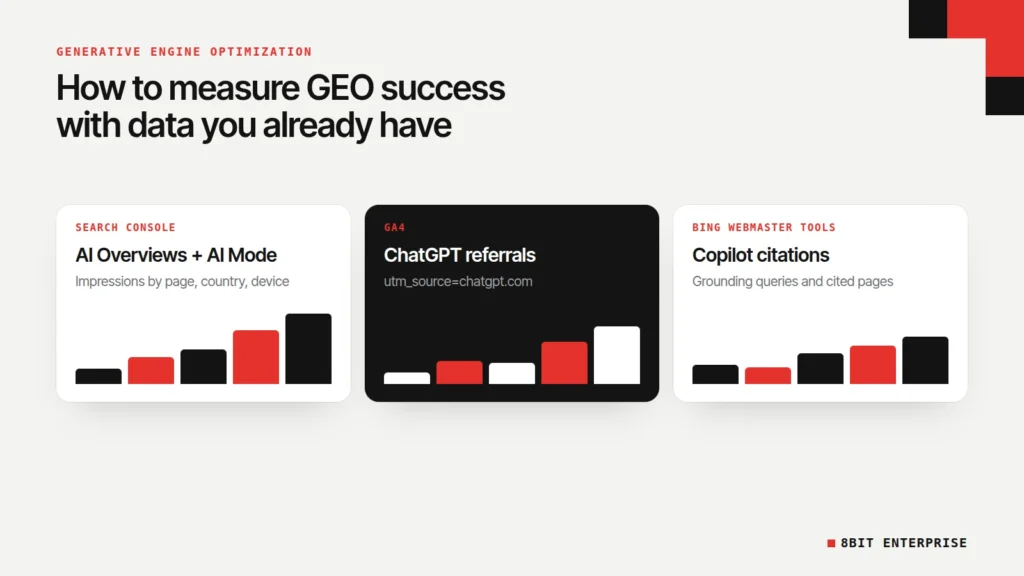
Quick answer: Here’s how to measure the success of generative engine optimization campaigns: start with free first-party data: Search Console’s Generative AI performance report for AI Overviews and AI Mode, ChatGPT referrals in Google Analytics through the utm_source=chatgpt.com tag, and Bing Webmaster Tools’ AI Performance report for Copilot citations. Then add a small, repeated prompt test.
What Is Generative Engine Optimization?
Generative engine optimization (GEO) is the work of getting your pages shown, cited or recommended inside AI answers, such as Google’s AI Overviews and AI Mode, ChatGPT, Copilot and Perplexity. You’ll also hear it called answer engine optimization (AEO), or simply the work to optimize a site for AI answer engines.
Google’s own position is that it’s the same job as SEO. Its guide to optimizing for generative AI features, published in May 2026, says these features are built on Google’s core ranking and quality systems, and that calling the work “AEO” or “GEO” doesn’t change it. So the generative engine optimization vs SEO debate matters less than one practical question: how do you know whether it’s working?
That’s where most advice falls short. The pages ranking for this question list metrics like “share of voice” and “positioning score” without saying where the numbers come from. Since June 2026, Google has given site owners a real source of data, and it’s free. This guide covers how to measure the success of generative engine optimization campaigns with that data first, and paid tools second.
TL;DR
- Search Console’s Generative AI performance report shows impressions in AI Overviews and AI Mode by page, country, device and date. It reached all websites worldwide on 31 August 2026.
- Clicks from AI Overviews and AI Mode are counted inside the normal Performance report, under the Web search type, so they can’t be separated.
- ChatGPT adds utm_source=chatgpt.com to its links, according to OpenAI, so its referrals show up in Google Analytics.
- Google says no third-party tool has access to its internal ranking or AI systems.
How to Measure the Success of Generative Engine Optimization Campaigns
You measure GEO success in layers, because no single tool sees every AI platform. Google, OpenAI and Microsoft each share different data, and only some of it is free. The reliable approach is to combine first-party reports from each platform with a small, repeatable prompt test, then judge the trend over months rather than single checks.
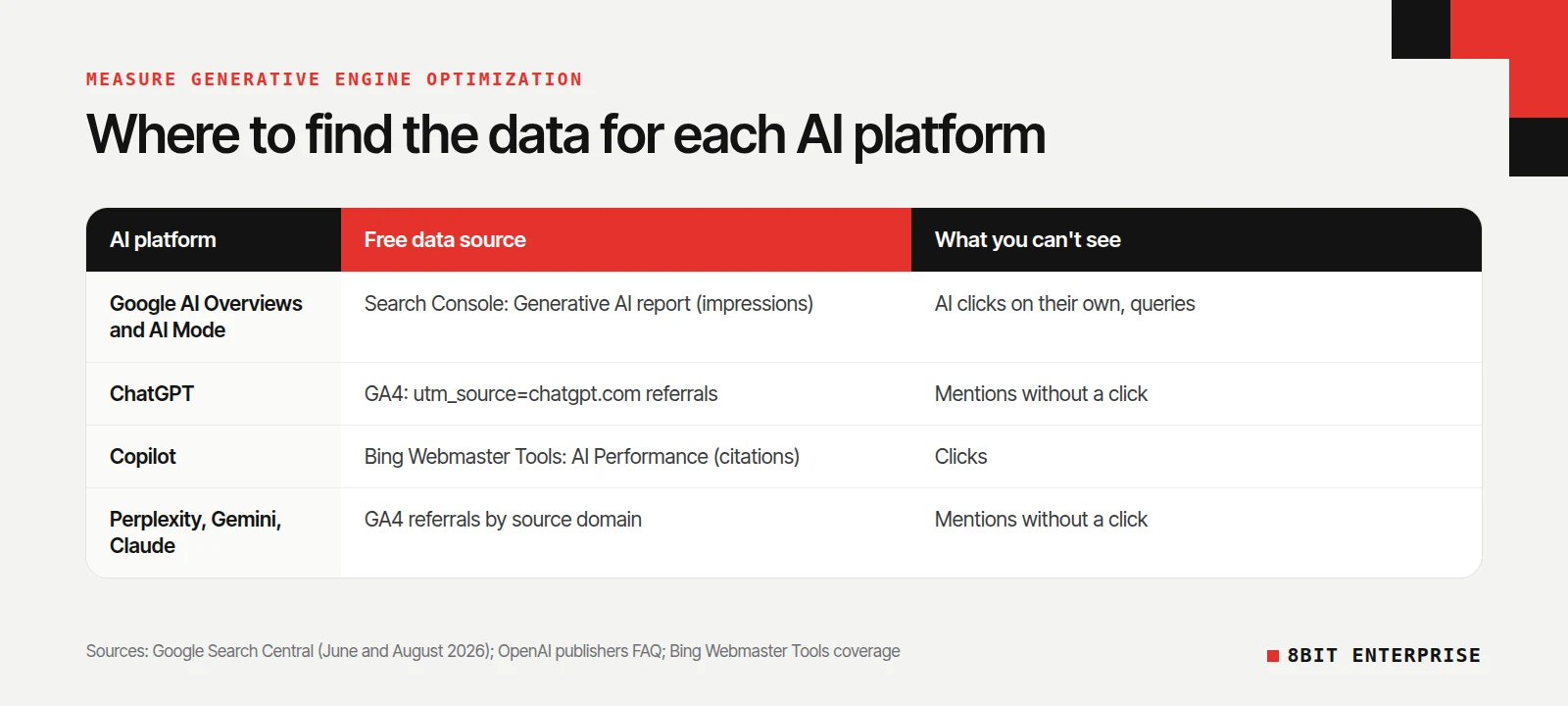
Here’s what each source can and can’t tell you:
| Source | What it measures | Cost | Main limit |
|---|---|---|---|
| Search Console, Generative AI performance report | Impressions in AI Overviews and AI Mode, by page, country, device and date | Free | Impressions only, no clicks or queries |
| Search Console, Performance report | Clicks from Google Search, including AI features | Free | AI clicks are mixed in with normal Web results |
| Google Analytics 4 | Visits and conversions from ChatGPT, Perplexity, Gemini and others | Free | Only counts people who click through |
| Bing Webmaster Tools, AI Performance report | How often Copilot and Bing AI answers cite your pages | Free | Microsoft surfaces only, no click data |
| Manual prompt tests | Whether AI answers mention or cite you for the questions buyers ask | Your time | Answers vary, so small samples mislead |
| Paid AI visibility tools | Prompt tracking at scale across several AI platforms | Monthly fee | Estimates, not data from the AI platforms |
The rest of this guide takes each source in turn.
How to Use Search Console’s Generative AI Performance Report
The Generative AI performance report is Google’s first official view of how often your pages appear in AI Overviews and AI Mode. Google announced it on 3 June 2026 and rolled it out to all websites worldwide by 31 August 2026. It’s the most reliable GEO data you can get for Google, because it comes from Google itself.
According to Google’s announcement, there are two reports, one for Search and one for Discover, and they show:
- Pages: which of your URLs appeared in generative AI features.
- Countries: where those appearances happened.
- Devices: desktop or mobile, for Search only.
- Dates: hourly, daily, weekly or monthly.
The metric is impressions: how often URLs from your site appeared in generative AI features. Coverage of the launch notes there are no clicks or query data in the report, and AI Overviews and AI Mode are combined rather than split.
Where the clicks went
Google’s AI features documentation says traffic from these features is “included in the overall search traffic in Search Console” and reported “in the Performance report, within the ‘Web’ search type.” In practice, that means you can see AI impressions in one report and total clicks in another, but not AI clicks on their own.
How to read it
- Export the pages list monthly. Track how many of your URLs appear at all. For a new site, going from zero to a handful is real progress.
- Compare it with your Performance report. Pages with AI impressions but falling clicks may be answered in full on the results page.
- Check countries against your market. Impressions in markets you don’t serve aren’t worth celebrating.
- Watch the trend, not the day. Daily numbers on a small site swing a lot.
How to Track ChatGPT and Other AI Referrals in GA4
AI assistants that link to sources send visitors you can measure in Google Analytics 4. ChatGPT makes this easier than most: OpenAI’s publishers FAQ says it adds the utm_source=chatgpt.com parameter to referral links, as long as you don’t block its OAI-SearchBot crawler.
To group AI traffic in one place, set up a custom channel in GA4:
- Open Admin, then Data display, then Channel groups, and copy the default group.
- Add a channel called AI assistants.
- Set the condition to source matching a regex such as
chatgpt\.com|perplexity\.ai|gemini\.google\.com|copilot\.microsoft\.com|claude\.ai. - Move the new channel above Referral, so these visits aren’t counted there first.
- Save it, then compare sessions and key events for that channel month by month.
The domain list is our suggestion, not an official standard. Check your own referral report for AI sources we haven’t listed, and expect some AI visits to show up as direct traffic when apps don’t pass a referrer.
The number that matters most here isn’t visits. It’s whether those visitors convert. A few AI referrals that turn into enquiries are worth more than a dashboard of mentions that never leave the chat window.
What Does Bing’s AI Performance Report Show?
Bing Webmaster Tools added an AI Performance report, in public preview, that shows how often Microsoft’s AI answers cite your pages. Coverage of the report describes data organised by grounding queries, the searches Copilot ran to build an answer, and by cited pages. It’s free with a verified site.
It’s worth a few minutes a month for two reasons. Grounding queries show the questions that led an AI to your content, which Google’s report doesn’t. And Copilot builds its answers from those grounding searches, which matters if your buyers use Microsoft products at work. Its limits are clear, though: it covers Microsoft surfaces only, and coverage notes there’s no click data.
How to Test AI Answers Without Fooling Yourself
Manual prompt testing means asking AI assistants the questions your buyers ask and recording if your brand is mentioned or cited. It’s the only way to see ChatGPT’s and Perplexity’s answers directly, but AI answers change between runs, so one-off checks are close to meaningless.
Here’s a simple method we recommend. It’s practical advice, not an industry standard:
- Write 20 to 30 buyer questions, split between questions with your brand name and questions without it.
- Run each question three times per platform in a logged-out or fresh session, since memory and personalisation change answers.
- Record three separate fields: mentioned, cited with a link, and recommended. Don’t merge them into one score.
- Repeat on the same day each month, with the same questions.
- Report the share of runs where you were cited, not whether you “appeared.”
A spreadsheet is enough for this. Paid AI visibility tools automate the same idea at a larger scale, which helps once you track hundreds of prompts. Keep Google’s warning in mind when you read their reports: its guide says “No third-party tool has access to our internal ranking or AI systems.” Their numbers are samples and estimates, not platform data.
What Not to Measure, According to Google
Google’s May 2026 guide includes a list of things you don’t need to do for its AI features, and they’re useful for deciding what not to track. If a GEO plan promises results from any of these, ask what evidence it’s based on.
- llms.txt and AI text files: “You don’t need to create new machine readable files, AI text files, markup, or Markdown to appear in Google Search.” The guide says Google Search ignores them.
- Chunking: “There’s no requirement to break your content into tiny pieces for AI to better understand it.”
- Special schema: “Structured data isn’t required for generative AI search,” though it still helps with rich results. We explain where schema still pays off in our schema markup guide.
- Manufactured mentions: “seeking inauthentic ‘mentions’ across the web isn’t as helpful as it might seem.”
What the guide does point to is ordinary work: indexable pages, unique content based on real experience, and accurate product and local business details. Those are the inputs. The reports above are how you check the outputs. For online stores, our guide to GEO for ecommerce covers the store-specific inputs.
Should You Opt Out of AI Overviews?
Search Console now has a setting that lets a site leave Google’s generative AI features. Google says “sites that opt out will not receive traffic or impressions from our generative AI features,” and the setting isn’t a ranking signal for other results. It reached all websites worldwide by 31 August 2026.
Coverage of the setting places it under Settings in a section called Search generative AI, with Include as the default. For most businesses that want customers, leaving it on Include makes sense, because opting out removes you from answers your competitors can still appear in. The case for opting out is narrower: publishers whose content is fully answered on the results page and who’d rather protect the click. Measure first with the reports above, then decide.
Common GEO Measurement Mistakes
Most GEO reporting problems come from treating estimates as facts, or from measuring visibility without checking whether it brings customers. Both are easy to miss when a dashboard looks busy. These six mistakes are worth checking your own reports for before you change strategy or budget.
- Judging from one prompt. AI answers vary between runs. Test each question several times.
- Mixing mentions and citations. A brand name in an answer and a link to your page are different results. Track them separately.
- Ignoring Search Console. It’s free, first-party and covers the AI features most people see.
- Expecting AI clicks in a separate column. Google counts them inside Web search results.
- Paying for a “visibility score” without its inputs. Ask which prompts, platforms and dates produce the number.
- Stopping at visibility. Tie AI referrals to enquiries or sales, or you won’t know what any of it is worth.
A Simple Monthly GEO Report
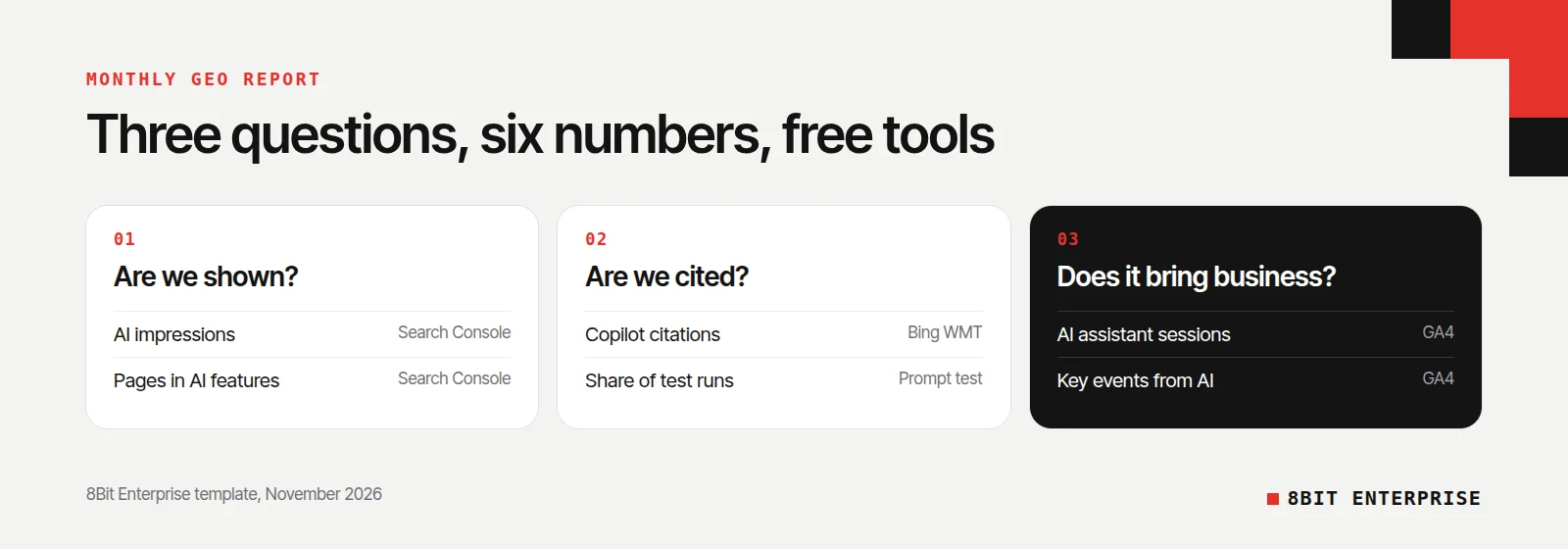
A useful GEO report fits on one page and answers three questions: are we being shown, are we being cited, and is it bringing business? You can build it from free tools in under an hour a month, which suits a small team that doesn’t need a paid platform yet.
| Question | Metric | Source |
|---|---|---|
| Are we shown in Google’s AI features? | AI impressions and number of pages appearing | Search Console, Generative AI report |
| Is Google traffic holding up? | Clicks from Web search | Search Console, Performance report |
| Are AI assistants sending visitors? | Sessions from the AI assistants channel | GA4 |
| Does that traffic convert? | Key events from the AI assistants channel | GA4 |
| Does Copilot cite us? | Citations and grounding queries | Bing Webmaster Tools |
| Do AI answers recommend us? | Share of test runs citing us | Monthly prompt test |
If you want help setting this up, or a check of what’s holding your pages back, our SEO team covers AI search as part of the same work.
Frequently Asked Questions
How do you measure the success of generative engine optimization campaigns?
Start with free first-party data: Search Console’s Generative AI performance report for AI Overviews and AI Mode impressions, GA4 for ChatGPT and other AI referrals, and Bing Webmaster Tools for Copilot citations. Add a monthly prompt test with repeated runs, and judge success on enquiries and sales, not mentions alone.
Can I see AI Overviews clicks in Search Console?
Not separately. Google’s documentation says traffic from AI Overviews and AI Mode is included in the Performance report under the Web search type. The Generative AI performance report, available to all websites since 31 August 2026, shows impressions by page, country, device and date, but not clicks.
How do I track ChatGPT traffic in Google Analytics?
OpenAI says ChatGPT adds utm_source=chatgpt.com to its referral links, so those visits appear in GA4 with chatgpt.com as the source. To see them grouped with other assistants, create a custom channel that matches AI domains and place it above Referral in your channel group.
What is the difference between GEO and SEO?
Google says there isn’t one for its own products. Its May 2026 guide states that its generative AI features use the same ranking and quality systems as Search, so SEO best practices still apply. The difference is in measurement: GEO also tracks citations and referrals from AI assistants outside Google.
Are paid AI visibility tools worth it?
They can save time once you track many prompts across several platforms. Treat them as samples, though:
- Google says no third-party tool has access to its internal ranking or AI systems.
- AI answers vary between runs, so check sample sizes.
- Free first-party reports should come first.
Conclusion
Learning how to measure the success of generative engine optimization campaigns is mostly about using the free data that now exists: Search Console’s AI report, ChatGPT referrals in GA4 and Bing’s citation data, backed by an honest prompt test. Track the trend each month, tie it to real enquiries, and be wary of any score that can’t show where its numbers come from.