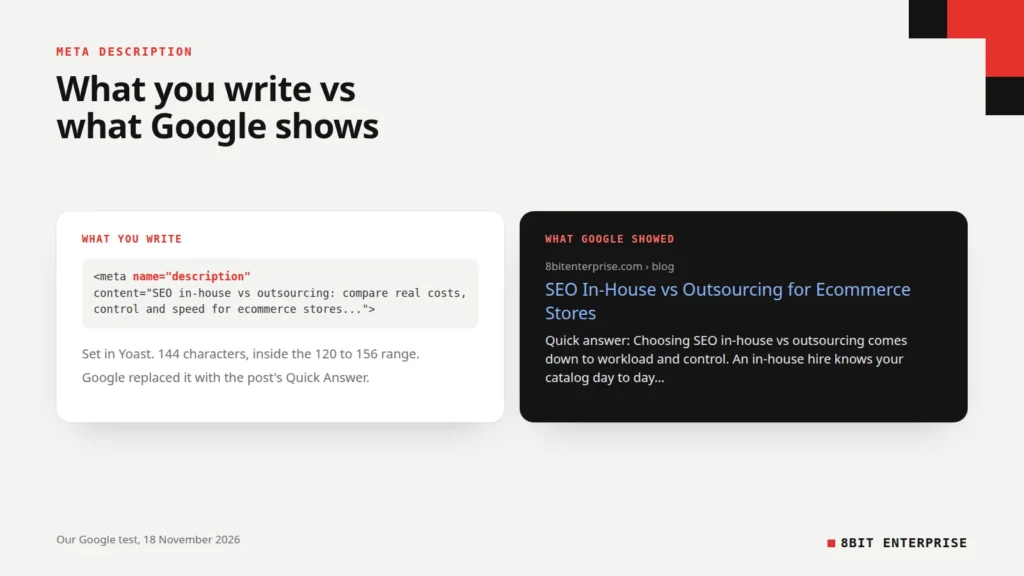
Quick answer: A meta description is an HTML tag that summarises a page in one or two sentences for search results. Google may show it under your title, but it often writes its own snippet from the page instead. Keep it unique, specific and roughly 120 to 156 characters, and make the page’s opening lines just as clear.
What Is a Meta Description?
A meta description is a short summary of a web page, written in the page’s HTML head for search engines. Google calls it a pitch that convinces searchers the page is what they want. It doesn’t appear on the page itself. It can appear under your blue title link in search results, where it helps people decide whether to click.
In code, it’s a single line:
<meta name="description" content="Shopify vs WooCommerce compared on real costs, control, upkeep and SEO, plus a weighted scorecard to help you pick the right platform.">Most site owners never touch that code. WordPress SEO plugins like Yoast, and platforms like Shopify, give you a text box and write the tag for you.
The catch is the word “can”. Google doesn’t promise to use your meta description, and in our own test it usually didn’t. This guide covers what a good one looks like, how long it should be, and what we learned when we checked which of ours Google actually showed.
TL;DR
- Google says snippets are “primarily created from the page content itself” and only sometimes use the meta description.
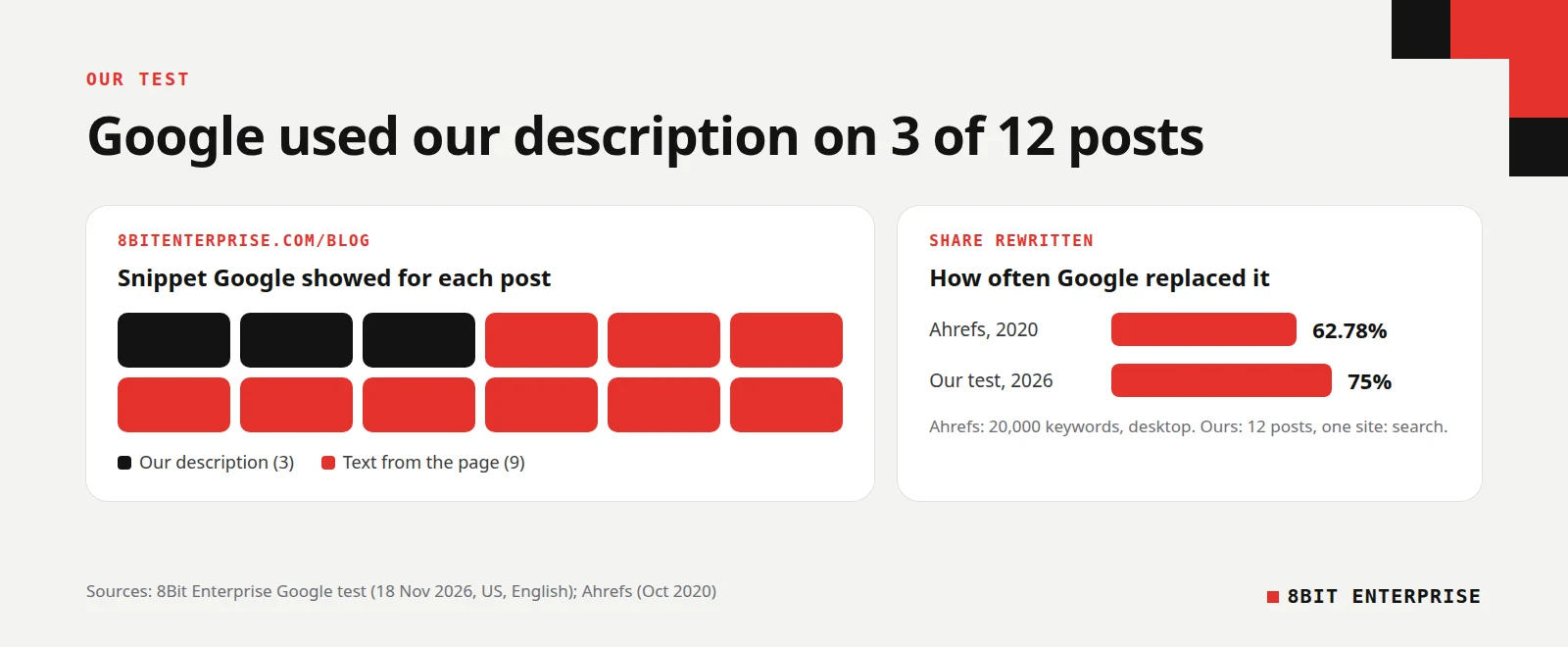
- In our test on 18 November 2026, Google showed our own description for 3 of 12 blog posts.
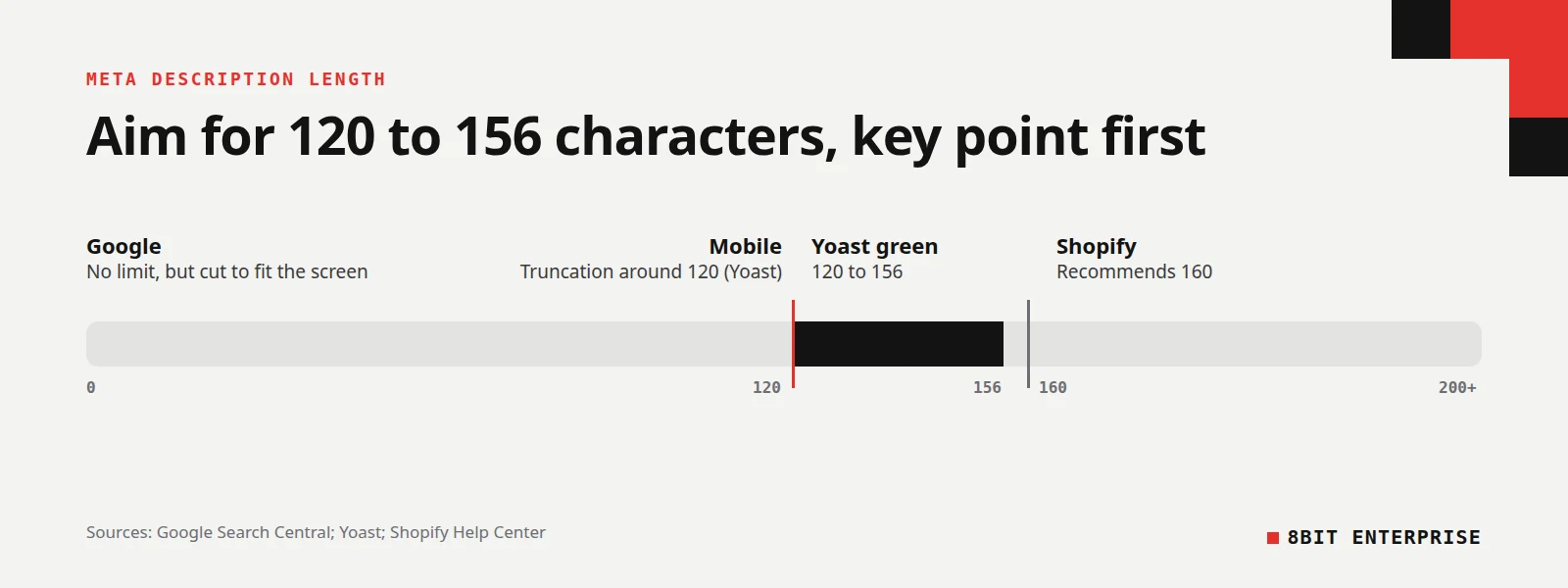
- Yoast flags descriptions under 120 or over 156 characters. Google sets no limit but truncates to fit the screen.
- Google said in 2009 that it doesn’t use the description tag in ranking. It still affects clicks.
Does Google Actually Use Your Meta Description?
Sometimes, and less often than most people expect. Google’s guide to snippets says snippets “are primarily created from the page content itself,” and that Google “sometimes uses the meta description HTML element if it might give users a more accurate description of the page.” Your description is a suggestion, not an instruction.
The best-known data comes from Ahrefs. Its study of 20,000 keywords (updated October 2020) compared hardcoded descriptions with the snippets Google showed on desktop, and found Google rewrote them 62.78% of the time.
What our own test found
We wanted a current number, so we ran it on our own blog. On 18 November 2026 we searched Google for site:8bitenterprise.com/blog/ (US results, English) and compared the snippet under each of the 12 live blog posts it returned with the meta description we had set in Yoast. Two older URLs in the results now redirect to other pages, so we left them out.
Google showed our description for 3 of the 12 posts. For the other 9, it showed a sentence from the article instead. Three of those snippets began with the words “Quick answer”, lifted straight from the summary box at the top of the post. Most of the rest were a one-line definition from the article’s opening.
Two smaller patterns stood out:
- Length didn’t decide it. All 12 descriptions were between 139 and 154 characters. The three Google kept were 149, 153 and 154 characters long.
- Colon-style descriptions were all replaced. Five of ours followed the pattern “Keyword: what this page covers”. Google rewrote all five. The three it kept read as plain sentences, such as “An ecommerce SEO audit can flag thousands of issues, and many are false alarms.”
The limits of this test
Twelve posts is a small sample, and a site: search isn’t how real people search. Google’s own documentation says it “might show different snippets for different searches,” so a post could show our description for one query and page text for another. Treat our result as one honest data point that lines up with the Ahrefs finding, not a rule.
How Long Should a Meta Description Be?
Aim for roughly 120 to 156 characters. Google itself says “there’s no limit on how long a meta description can be,” but it truncates the snippet “as needed, typically to fit the device width.” A description that runs long gets cut mid-sentence, so put the most important words first.
Different tools give slightly different targets, which is why you’ll see several numbers quoted:
| Source | What it says | What it means for you |
|---|---|---|
| Google Search Central | No limit, truncated to fit the device | Length won’t break anything, but extra text may be hidden |
| Yoast SEO | Flags under 120 or over 156 characters | Its green light is a sensible target in WordPress |
| Yoast’s guide | Truncation happens around 120 characters on mobile | Put the key message in the first 120 characters |
| Shopify Help Center | Recommends 160 characters | Shopify’s own box allows a little more room |
Yoast’s guide to meta descriptions notes that most snippets in Google run between 120 and 156 characters. That range is a practical target, not a ranking rule. Our test showed descriptions inside it still get rewritten, so a perfect length on its own won’t keep yours in the results.
Are Meta Descriptions a Ranking Factor in Google?
No. Google stated this directly in a 2009 Search Central post on meta tags: “Even though we sometimes use the description meta tag for the snippets we show, we still don’t use the description meta tag in our ranking.” Adding keywords to your description won’t move your position.
That doesn’t make the tag useless. When Google does show it, the description is part of what a searcher reads before choosing a result. A clear, specific summary can earn the click that a vague one loses, even at the same position.
How to Write a Meta Description That Gets Clicks
A good meta description tells the searcher exactly what they’ll get from this page and why it’s worth their time. Google’s advice is to keep each one unique and accurate, and its starter guide adds that a good description is “short, unique to one particular page, and includes the most relevant points of the page.”
These steps are the ones we follow for every post:
- Answer the search in the first sentence. Say what the page covers in plain words a searcher would use.
- Add one specific detail. A number, a price range, a date or a named tool makes a summary believable.
- Say what the reader can do with it. Compare, check, choose or fix gives people a reason to click.
- Write it as a sentence, not a label. Skip the “Keyword: list of topics” formula. In our test, Google replaced every description written that way.
- Check the length. Keep it between about 120 and 156 characters, with the key message in the first 120.
- Make the page’s opening match. Google often uses your first lines instead, so write those as carefully as the tag.
Step six is the one most guides skip. Since Google rewrote 9 of our 12 descriptions using text from the page, the opening paragraph is effectively a second meta description. Write it to stand on its own.
Meta Description Examples
The clearest way to see the difference is side by side. Three examples come from our own blog, and the weaker versions are written for illustration. The weak ones are vague or written as labels. The stronger versions use a plain sentence with one specific detail.
| Page | Weaker description | Stronger description |
|---|---|---|
| Platform comparison | Shopify vs WooCommerce: everything you need to know about both platforms. | Shopify vs WooCommerce compared on real costs, control, upkeep and SEO, plus a weighted scorecard to help you pick the right platform. |
| Audit checklist | Ecommerce SEO audit checklist: issues, tools and fixes. | An ecommerce SEO audit can flag thousands of issues, and many are false alarms. See which warnings to ignore and which to fix. |
| Pricing guide | Learn all about SEO packages and pricing for your business today. | SEO packages for small business explained in hours, not promises. See what $500 to $2,500 a month buys. |
| Product page | Buy our best leather wallet. High quality. Free shipping. | Slim leather wallet that holds 8 cards and cash, handmade in full-grain leather. Free US shipping and 30-day returns. |
The first three strong versions are the descriptions Google kept in our test, lightly shortened. The wallet is a made-up example. The product example follows Google’s advice to include specific facts, such as price or details, rather than a list of keywords.
Title Tags and Meta Descriptions: How They Work Together
Your title tag and meta description form one search listing, so write them as a pair. The title is the blue link and does the heavy lifting for relevance. The description sits underneath and gives the reason to click. Repeating the title in the description wastes the space.
A simple way to split the job: the title names the topic, and the description adds the detail the title couldn’t fit. For this post, the title asks the question “What is a meta description?” and the description adds our test result and what the reader will learn.
Titles also get cut short in results, so keep the main words near the start. We aim for about 50 to 60 characters on our titles, which keeps the full question visible on most screens.
How to Add a Meta Description in Yoast and Shopify
Most platforms let you set a meta description without touching code. On WordPress, an SEO plugin like Yoast adds a field to every post and page. On Shopify, each page has a search engine listing section. If you leave the field empty, the platform or Google fills the gap from your content.
Yoast meta description
In the WordPress editor, open the Yoast SEO panel for the post and find the search appearance section. Type your summary into the meta description field. Yoast shows a preview of the search result and a coloured bar that turns green between 120 and 156 characters. You can also insert variables such as the post title, but a hand-written sentence is usually clearer.
Shopify meta description
According to Shopify’s SEO help page, you go to Online Store, then Pages, open the page, and click Edit website SEO in the search engine listing preview section. Enter your summary in the Description field and save. Shopify recommends 160 characters for the description and allows up to 70 for the page title.
Meta Description vs og:description
The meta property og:description is a separate tag used when someone shares your page on social platforms or in messaging apps. It belongs to the Open Graph protocol, while the meta description is for search results. Both summarise the page, but they appear in different places and can say different things.
On our own blog, 6 of 12 posts use a different og:description from their meta description, because Yoast lets you set a separate social description. That’s fine as long as both are accurate. A social preview can be a little more conversational, since the reader is scrolling a feed rather than comparing search results.
If you’re not sure what a shared link will show, our free OG image checker checks the Open Graph tags in your page’s source code and shows how the link may look when shared.
Why Duplicate Meta Descriptions Are a Problem
Google’s snippet guide is direct about this: “Identical or similar descriptions on every page of a site aren’t helpful when individual pages appear in search results.” When two pages share a description, neither one describes its own page well, so Google has good reason to pull text from the page instead.
Duplicates usually come from copying an old page as a template, or from a theme that fills every page with the same website meta description. Online stores can create them at scale when product variants or filtered category pages share one summary. A site crawler such as Screaming Frog or Semrush Site Audit will list them, and our ecommerce SEO audit checklist explains which audit warnings deserve a fix first.
For large catalogues where writing each one by hand is impossible, Google suggests generating descriptions from each page’s own data, such as a product’s name, price and key details.
Common Mistakes With Meta Descriptions
Most weak meta descriptions fail for the same reason: they describe the website or the keyword instead of the specific page. Google then has little reason to prefer them over the page’s own text. These are the common ones to check for before you publish.
- Copying one description across pages. Each page needs its own, or Google has little reason to use any of them.
- Writing a keyword list. Google warns against descriptions made of keywords. Write a sentence.
- Burying the point. If the key message comes after 120 characters, mobile users may never see it.
- Promising what the page doesn’t deliver. A description that oversells costs you the visitor’s trust after the click.
- Polishing the tag but not the page. Google uses page text most of the time, so a vague opening paragraph undoes a good description.
Frequently Asked Questions
What is a meta description in SEO?
In SEO, a meta description is the HTML tag that summarises a page for search results. Google may show it as the snippet under your title link, which can affect whether people click. Google doesn’t use it to rank pages, and it often writes its own snippet from the page content instead.
Why does Google show a different description from the one I wrote?
Google builds snippets mainly from page content and picks the text it thinks best matches each search. Its documentation says it may show different snippets for different searches. Ahrefs found Google rewrote descriptions 62.78% of the time, and in our own test it replaced 9 of our 12.
What is the difference between a meta title and a meta description?
The meta title, or title tag, is the clickable headline of your search result and helps Google understand the topic. The meta description is the summary beneath it. Titles work best at around 50 to 60 characters, while descriptions work best at roughly 120 to 156 characters.
Do I need a meta description on every page?
Write one for every page you want people to find in search, starting with your most important pages. Google’s guide recommends unique descriptions wherever possible:
- Homepage and service pages
- Product and category pages
- Blog posts and guides
- Large catalogues, generated from each page’s own data
Can a meta description be too short?
Yes. Yoast flags descriptions under 120 characters, because a very short one often lacks the detail that earns a click. Google sets no minimum, but a ten-word summary gives it little reason to prefer your text over the page content. Aim for one or two complete sentences with one specific detail.
Conclusion
A meta description is your suggested summary for search results, and Google treats it as exactly that, a suggestion. Write a unique, specific sentence of about 120 to 156 characters for each page, then give your opening paragraph the same care, because that’s the text Google shows most often. If you’d like a second pair of eyes on how your pages appear in search, our SEO team can review them with you.