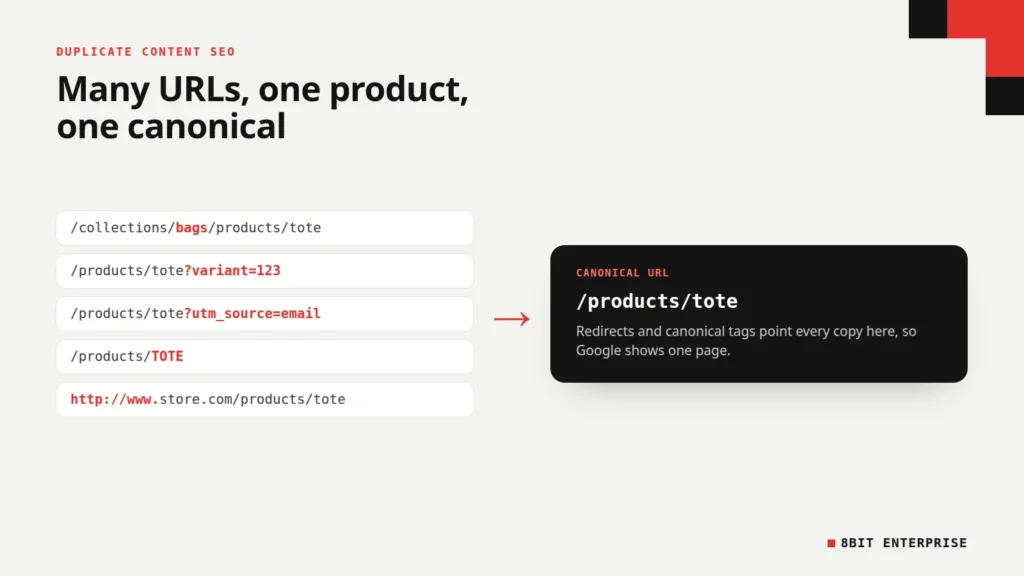
Quick answer: Duplicate content SEO is about the same page being reachable at more than one URL. Google doesn’t penalize normal duplication. It groups the copies and picks one URL to show. The risk is Google choosing the wrong URL or splitting signals, so use redirects, canonical tags and consistent internal links to point everything at one version.
What Is Duplicate Content in SEO?
Duplicate content is the same, or almost the same, content available at more than one URL. On most sites it happens by accident, not by copying. Google lists the usual causes in its guide to canonicalization: regional versions, mobile and desktop versions, HTTP and HTTPS versions, sorting and filtering, and demo sites left open to crawlers.
Online stores are especially prone to it. One product can appear under its own URL, under each collection it belongs to, with a variant ID, with a tracking code and in a sorted category list. To a shopper, these are the same page. To a search engine, each one is a separate address to crawl.
This duplicate content SEO guide explains what Google actually does with duplicate pages, why product pages get duplicated, and what we found when we tested Shopify’s own demo store and our own site. It ends with a fix list you can hand to whoever runs your store.
TL;DR
- Google says “Some duplicate content on a site is normal and it’s not a violation of Google’s spam policies.”
- Google groups duplicate URLs and picks one canonical. Your canonical tag is “a hint, not a rule.”
- On Shopify’s Dawn demo store, every duplicate product URL we tried either redirected or pointed its canonical tag at the main product URL.
- Redirects and canonical tags are strong signals. Sitemaps are weak. Google advises against robots.txt and noindex for this job.
Is There a Duplicate Content Penalty?
Not for ordinary duplication. Google’s Search Central team wrote in 2008, “There’s no such thing as a ‘duplicate content penalty.’ At least, not in the way most people mean when they say that.” Its current documentation agrees that some duplicate content is normal and isn’t a spam policy violation.
The exception is deliberate copying. The same 2008 post on the duplicate content penalty says there are penalties for “scraping content from other sites and republishing it,” or republishing content “without adding any additional value.” It also quotes Google’s rule that duplication “is not grounds for action on that site unless it appears that the intent of the duplicate content is to be deceptive and manipulate search engine results.”
So the honest answer on Google duplicate content penalties is no for technical duplicates, and yes for scraped or mass-produced copies built to game rankings.
Why Is Having Duplicate Content an Issue for SEO?
Duplicate content is an issue because Google, not you, decides which copy to show. When it finds pages with the same main content, it clusters them and picks one URL as the canonical. If it picks a URL with a tracking code or a collection path, that’s the address searchers see, and the version you’d prefer may never appear.
Google’s own guidance lists four reasons to state your preference:
- Choosing the URL people see. Google’s example is preferring a clean product URL over one with an ad click ID attached.
- Consolidating signals. Links pointing to different copies are combined only if Google knows they belong together. Its 2008 post warns that missed duplicates “may dilute the strength of that content’s ranking signals by splitting them across multiple URLs.”
- Simpler tracking. One URL per product makes analytics and Search Console data far easier to read.
- Crawl time. Google says it’s better for Googlebot to crawl new or updated pages “rather than crawling duplicate versions of the same content.”
For a small store, crawl time rarely matters. Picking the wrong URL and splitting links matter at any size.
Why Do Product Pages Create Duplicate Content?
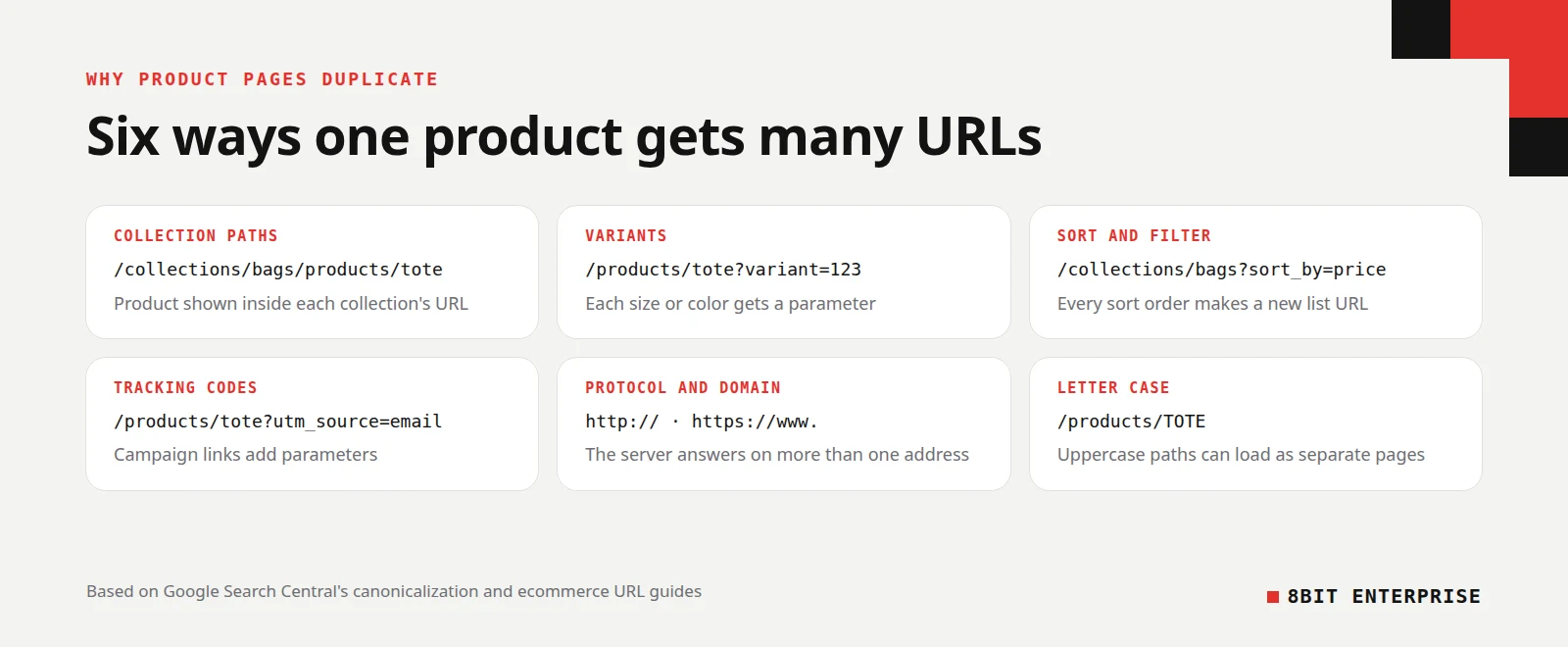
SEO duplicate content on product pages almost always comes from the way the store builds URLs, not from anyone copying text. A single product can be reached through collection paths, variant parameters, tracking codes, sort and filter options and protocol or domain variants. Each route creates another URL that Google has to group.
Duplicate content on the same site
These are the common sources within one store:
| Source | Example URL | Why it happens |
|---|---|---|
| Collection paths | /collections/bags/products/tote | The platform lets products live inside each collection’s URL |
| Variants | /products/tote?variant=123 | Each size or color gets its own parameter |
| Sorting and filtering | /collections/bags?sort_by=price-ascending | Every sort order or filter creates a new list URL |
| Tracking codes | /products/tote?utm_source=email | Campaign links add parameters to the same page |
| Protocol and domain | http://, https://www. and https:// versions | The server answers on more than one address |
| Letter case | /products/TOTE | Some servers treat uppercase paths as separate pages |
Duplicate content on different domains
The second kind is the same text on several websites, which is common when stores use the manufacturer’s product description. That isn’t the scraping Google’s 2008 post warns about, but identical text gives Google no reason to prefer your page over another store’s. Google’s 2008 post says that if your business model “inherently involves content duplication,” it’s something to “think twice about if your business model is going to rely on search traffic.”
Rewriting descriptions for your best-selling products gives Google a reason to show your page rather than another store’s identical copy. For regional stores selling the same products in the same language, Google recommends using canonical tags together with hreflang.
What We Found on Shopify’s Dawn Demo Store
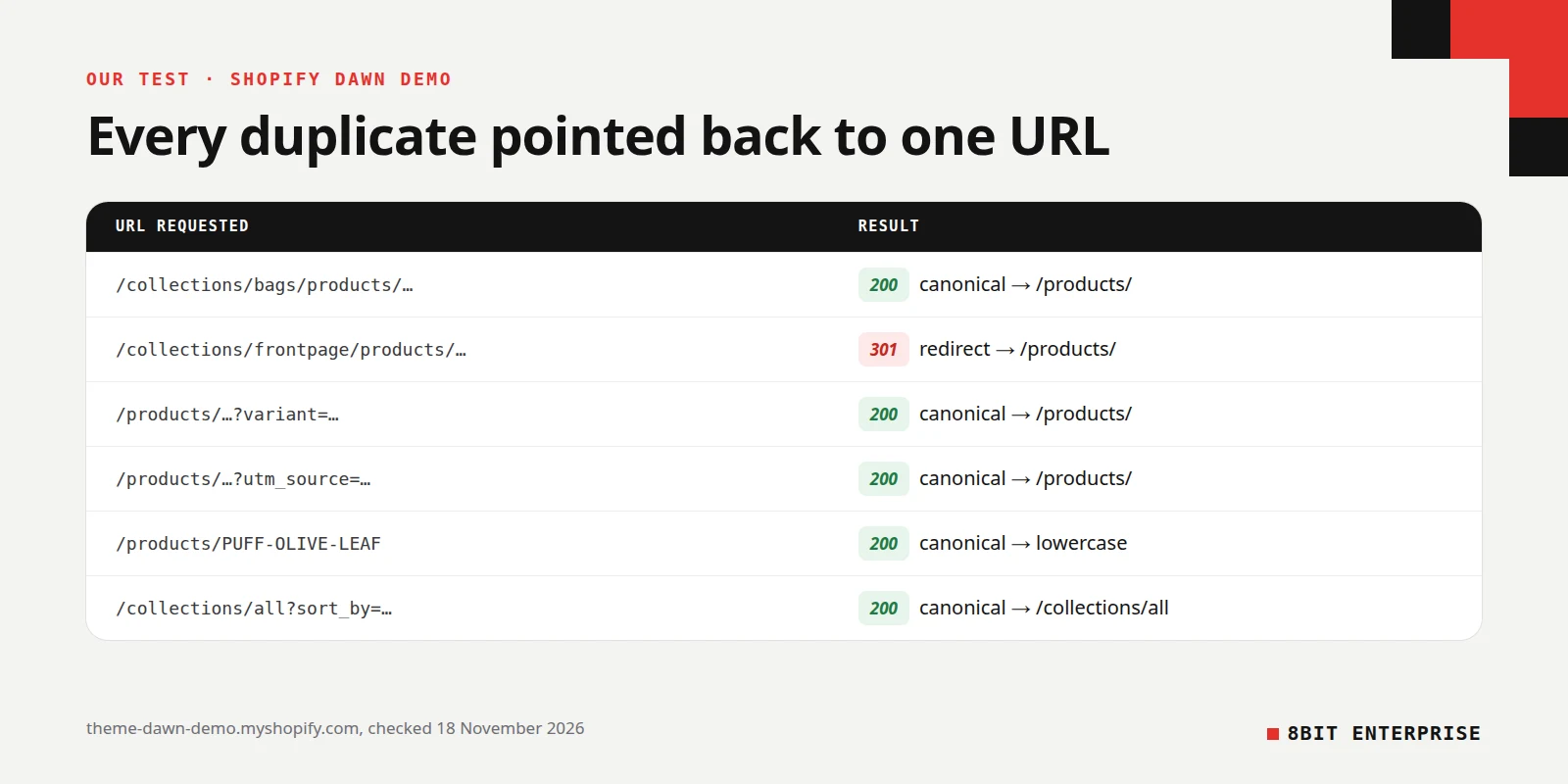
We tested how Shopify handles these duplicates using its official Dawn theme demo store on 18 November 2026. We requested each duplicate URL for one product and one collection, then recorded the response and the canonical tag. Shopify handled every case for us, which is why most Shopify stores don’t need to fix product URLs by hand.
| URL we requested | What happened |
|---|---|
| Product inside a collection it belongs to | Loaded (200), canonical pointed to /products/ URL |
| Product inside a collection it isn’t in | 301 redirect to /products/ URL |
| Product with a real ?variant= ID | Loaded, canonical pointed to /products/ URL without the variant |
| Product with ?utm_source= tracking | Loaded, canonical pointed to clean /products/ URL |
| Product URL in capitals | Loaded, canonical pointed to lowercase URL |
| Collection sorted by price | Loaded, canonical pointed to the unsorted collection |
| Collection with an availability filter | Loaded, canonical pointed to the unfiltered collection |
The store’s robots.txt also blocks crawling of sorted collection URLs and of URLs that combine more than one filter. Its product sitemap listed 32 product URLs, all in the /products/ format, with no collection paths.
What this means for your store
On a standard Shopify setup, the platform already sends Google the right signals. Problems usually come from changes made later: a custom theme that drops the canonical tag, an app that creates its own product pages, or menus that link to collection paths instead of the main product URL. Those are the things to check.
What we found on our own WordPress site
We ran the same kind of test on our blog. The HTTP, www and no-trailing-slash versions all 301 redirect to the main URL, and old ?p= post IDs redirect too. A version with a tracking code and an uppercase version both loaded, with Yoast’s canonical tag pointing to the correct URL.
Search Console’s URL Inspection confirmed that Google chose the same canonical we declared for our schema markup post. It also showed one lag worth knowing about. An old post we later redirected was last crawled on 5 November 2026, before the redirect, so Search Console still listed it as indexed. A redirect only takes effect in Google once it recrawls the old URL.
How to Fix and Avoid Duplicate Content
The fix is to choose one URL for each page, then make every signal point to it. Google ranks the methods by strength: redirects and canonical tags are strong signals, and including a URL in your sitemap is a weak one. Google says combining them increases “the chance of your preferred canonical URL appearing in search results.”
- Find the duplicates. In Search Console, open the Page indexing report and look for duplicate statuses. A crawler such as Screaming Frog lists URLs that share a title or canonical.
- Pick the canonical for each page. For products, this is usually the shortest, cleanest URL, such as /products/name.
- Redirect URLs that shouldn’t exist. Old product URLs, HTTP and www versions should 301 redirect to the canonical.
- Add a canonical tag to URLs that must stay. Variants, tracking links and sorted lists need to load for shoppers, so point their canonical at the main page. Include a self-referencing canonical on the main page too.
- Link to the canonical everywhere. Menus, collection grids and internal links should use the main product URL. Google says consistent internal linking “helps Google understand your preference.”
- List only canonical URLs in your sitemap. A sitemap that lists one URL while your canonical tag names another sends mixed signals.
- Check the result. Use URL Inspection in Search Console to compare the user-declared canonical with the Google-selected canonical.
To avoid duplicate content on new product pages, set these rules up once: give each variant its own URL with a path or query parameter, never a # fragment, and don’t link internally to tracking or session parameters. Google’s guide to ecommerce URL structure notes that it “does not use fragment identifiers in indexing,” so /t-shirt#black and /t-shirt#white count as one page.
Redirect, Canonical or Noindex: Which Should You Use?
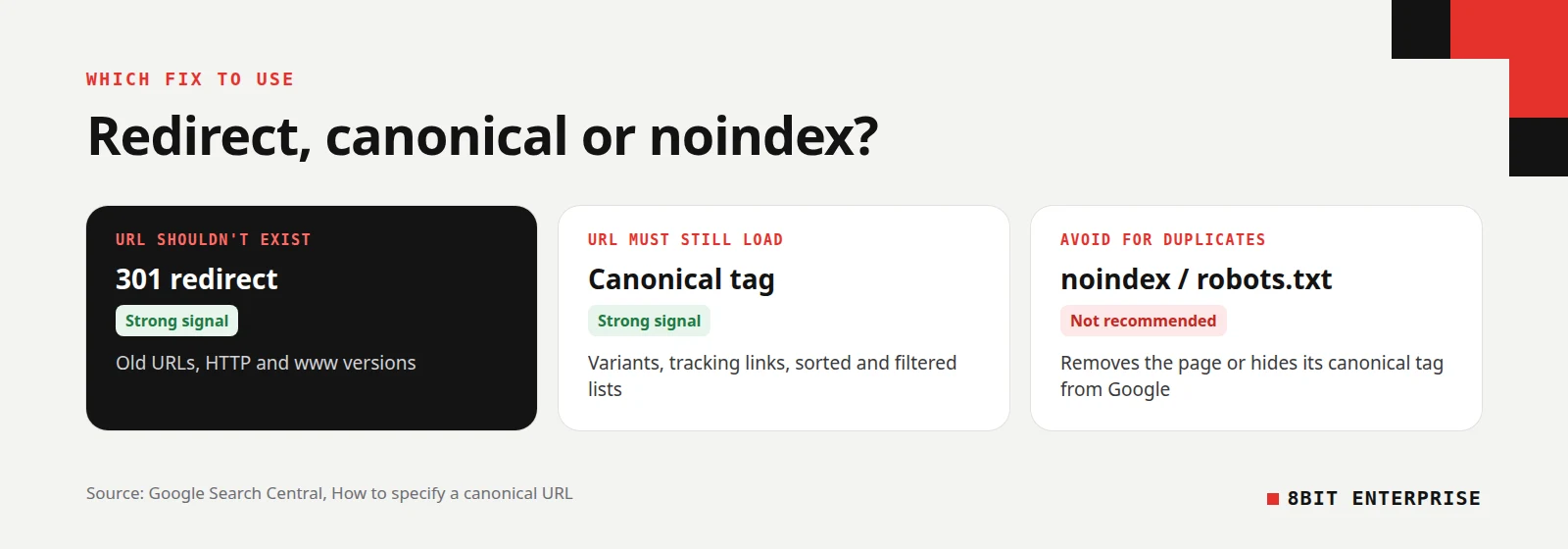
Use a 301 redirect when the duplicate URL has no reason to exist, and a canonical tag when it needs to load for shoppers. Google advises against noindex and robots.txt for canonicalization within a site. Noindex removes the page from Search entirely, and a URL blocked in robots.txt can still be indexed without its content.
| Method | Google’s view | Use it for | Watch out for |
|---|---|---|---|
| 301 redirect | Strong signal | Old URLs, HTTP and www versions | Visitors never see the old URL again |
| rel=”canonical” tag | Strong signal | Variants, tracking links, sorted and filtered lists | Google may still choose a different URL |
| Sitemap inclusion | Weak signal | Listing your preferred URLs | Only helps when it matches your canonical tags |
| noindex | Not recommended for this | Pages that shouldn’t be in Search at all | Blocks the page from Search completely |
| robots.txt block | Not recommended for this | Saving crawl time on endless filter combinations | Blocked URLs may still be indexed |
Shopify’s demo store combines these methods: canonical tags on sorted and filtered collection URLs, plus robots.txt rules for the sort and multi-filter versions. The robots.txt rules there save crawl time. The canonical tags do the actual job of choosing which URL Google shows.
What Search Console’s Duplicate Statuses Mean
Search Console’s Page indexing report uses a few statuses for duplicate pages, and only some of them need action. They tell you whether Google agrees with the canonical you set. A duplicate status isn’t an error in itself. It means Google grouped the page with another one and chose which URL to index.
| Status | What it means | What to do |
|---|---|---|
| Alternate page with proper canonical tag | The page points to its canonical, which is indexed | Nothing |
| Duplicate without user-selected canonical | No canonical was set, so Google chose one | Add a canonical tag if Google’s choice is wrong |
| Duplicate, Google chose different canonical than user | Google ignored your canonical tag | Check that the pages really match, and align links and sitemap |
| Page with redirect | The URL redirects, so it won’t be indexed | Nothing, if the redirect is intended |
Google’s Page indexing report help adds that if you think a page isn’t a duplicate of Google’s chosen canonical, you should make sure “the content differs substantially between the two pages.”
Common Mistakes With Duplicate Content SEO
Most duplicate content mistakes come from fixing the wrong thing. Store owners rewrite product copy when the real problem is URLs, or block pages in robots.txt when a canonical tag was needed. These are the mistakes to check for before you change anything on a live store.
- Treating it as a penalty. Technical duplicates aren’t punished. Panic changes often cause more harm than the duplicates did.
- Blocking duplicates in robots.txt. Google can’t read the canonical tag on a blocked page, and may index the URL anyway.
- Using noindex instead of a canonical. It removes the page from Search instead of combining its signals.
- Linking menus to collection paths. Internal links to /collections/x/products/y work against your canonical tag.
- Using # fragments for variants. Google ignores fragments, so separate colors on #black and #white look like one page.
- Copying one description across products. Similar products with identical copy give Google little reason to treat them as different pages. Our guide to meta descriptions covers the same problem for search snippets.
Frequently Asked Questions
Does Google penalize duplicate content?
Google doesn’t penalize ordinary duplicate content, such as the same product at several URLs. Its documentation says some duplication is normal and not a spam policy violation. Penalties apply to scraped or copied content built to manipulate rankings, such as republishing other sites’ pages without adding any value of your own.
How much duplicate content is acceptable?
Google doesn’t publish a percentage. Its canonicalization guide says some duplicate content on a site is normal. What matters is that each important page has one clear canonical URL, and that most of your pages offer something their duplicates don’t. A shared header, footer or shipping note isn’t a problem.
Does duplicate content hurt SEO?
It can, but not through a penalty. Duplicates can cause Google to show a URL you didn’t want, split links across several versions, or waste crawl time on large sites. Setting canonical tags, redirecting unneeded URLs and linking to one version consistently prevents most of the harm.
How do I find duplicate content on my site?
Start with free and low-cost tools:
- Search Console’s Page indexing report, filtered by duplicate statuses
- URL Inspection, to compare your canonical with Google’s choice
- A crawler such as Screaming Frog, sorted by duplicate titles
- A site: search in Google for your product name
Should I rewrite manufacturer product descriptions?
Rewrite them for your most important products first. When many stores publish identical manufacturer text, nothing on your page sets it apart from theirs. Adding your own details, photos and answers to common questions gives Google a reason to show your page instead.
Conclusion
Duplicate content SEO is mostly about control, not penalties. Google groups duplicate URLs on its own, so your job is to make the right URL the obvious choice: redirect what shouldn’t exist, set canonical tags on what must stay, and link to one version everywhere. For a wider review of what to fix first, see our ecommerce SEO audit checklist, or ask our SEO team to check your store’s canonicals for you.