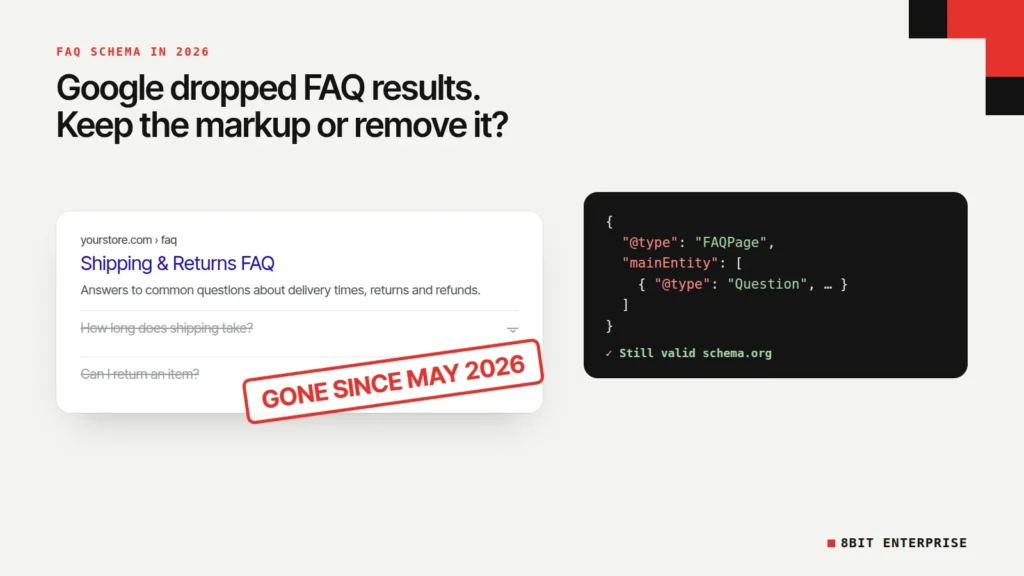
Quick answer: FAQ schema is FAQPage structured data that marks up questions and answers on a page. Google stopped showing FAQ rich results on 7 May 2026, so it no longer adds dropdowns under your listing. The markup is still valid and harmless when it matches visible content. Keep it on real FAQs, and remove it where it’s hidden or duplicated.
What Is FAQ Schema?
FAQ schema is structured data, using the schema.org FAQPage type, that labels a list of questions and their answers so machines can read them. Each question is a Question with a name, and each answer is an acceptedAnswer holding the answer text. Most sites add it as a JSON-LD script block, the format Google recommends.
You’ll see it called FAQ schema markup, FAQ markup, FAQPage schema or FAQ structured data. They’re the same thing. For the bigger picture, see our guide to schema markup.
For years, adding FAQ schema could show your questions as expandable dropdowns under your Google result. That was the reason most people added it. In 2026 that reason is gone, and several guides ranking for this topic haven’t caught up. Some still tell you to check FAQ markup in Google’s Rich Results Test, a tool that dropped FAQ support in June 2026.
So the useful question now isn’t how to get FAQ rich results. It’s what the markup still does, and whether it should stay on your pages.
TL;DR
- Google stopped showing FAQ rich results on 7 May 2026 and removed the documentation on 15 June 2026 (Google Search Central changelog).
- In our test on 14 November 2026, the Rich Results Test ignored the FAQPage markup on our homepage, while the Schema Markup Validator still read it with 0 errors.
- Google says AI Overviews need no special schema, and an Ahrefs study of 1,885 pages found no clear lift in AI citations from adding schema.
- Visible, accurate FAQ markup is safe to keep. Hidden or duplicated markup should go.
What Changed With FAQ Rich Results in 2026?
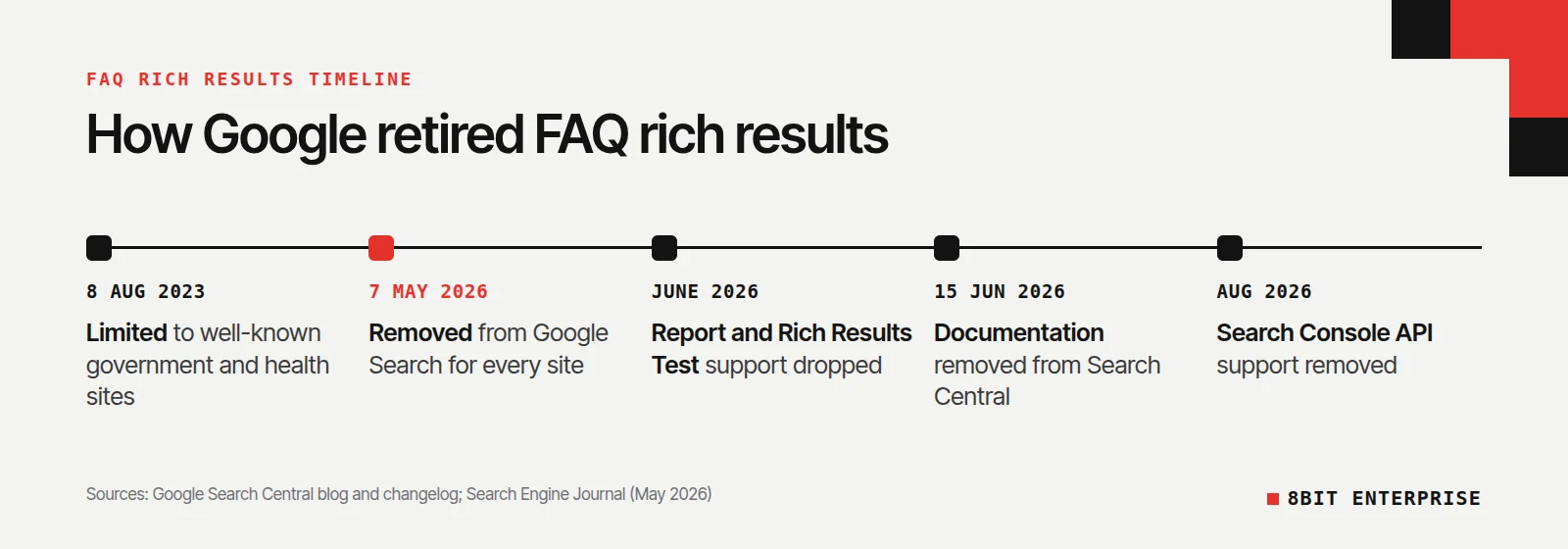
Google removed FAQ rich results in two steps. In August 2023 it limited them to well-known government and health websites. On 7 May 2026 it stopped showing them for everyone. The Search Console report, the search appearance filter and Rich Results Test support followed in June 2026, and API support in August 2026.
Here’s the full timeline, taken from Google’s own pages:
| Date | What Google changed | Source |
|---|---|---|
| 8 August 2023 | FAQ rich results limited to “well-known, authoritative government and health websites” | Google Search Central blog |
| 7 May 2026 | FAQ rich results no longer appear in Google Search | Search Central changelog, 8 May 2026 |
| June 2026 | FAQ search appearance, Search Console rich result report and Rich Results Test support dropped | Google notice, reported by Search Engine Journal |
| 15 June 2026 | FAQ rich result documentation removed | Search Central changelog |
| August 2026 | FAQ support removed from the Search Console API | Google notice, reported by Search Engine Journal |
FAQ wasn’t the only casualty. Google’s Search Central changelog shows the same pattern for other types: course info, estimated salary, learning video, special announcement and vehicle listing results were retired in September 2025, and practice problems in January 2026.
What Google said about removing the markup
When Google first restricted FAQ results in 2023, its HowTo and FAQ announcement on the Search Central blog said: “While you can drop this structured data from your site, there’s no need to proactively remove it.” The 2026 notice didn’t ask anyone to remove FAQ markup either. According to Search Engine Journal’s report of the change, Google published no blog post explaining the change, only a documentation notice.
Does FAQ Schema Still Work on Google?
FAQ schema no longer produces anything visible in Google Search. It’s still valid schema.org code, and Google’s general rules still apply to it, so markup that describes hidden content can still cause a manual action. What it no longer does is earn extra space in results, and Google’s own testing tool has stopped reporting on it.
Our test: what Google’s tools see now
Our own homepage carries FAQPage markup for the questions shown on the page. On 14 November 2026 we ran the same URL through Google’s Rich Results Test and the Schema Markup Validator.
The Rich Results Test reported three valid items: Breadcrumbs, Local businesses and Organization. The FAQPage block wasn’t listed at all, not as valid, not as an error.
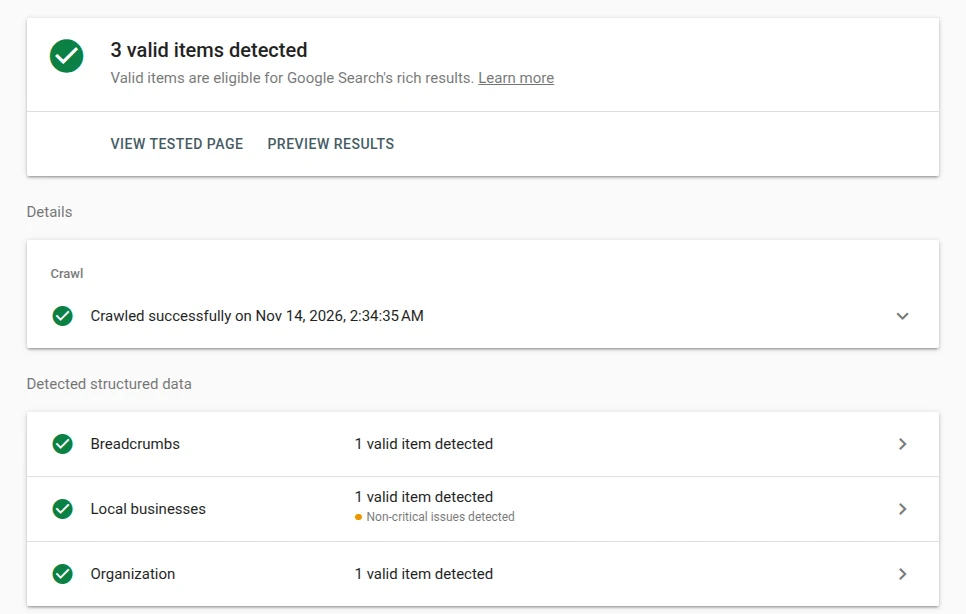
The Schema Markup Validator, which checks code against schema.org rather than Google features, found the FAQPage with 0 errors and 0 warnings.

That gap matters for anyone checking their work. If you test FAQ schema in the Rich Results Test today and see nothing, your code isn’t necessarily broken. Google just doesn’t look for it anymore. To test FAQ schema now, use the Schema Markup Validator at validator.schema.org.
Is a broken FAQ block now a risk?
Less than before, but not zero. Google’s structured data policies still say “Don’t mark up content that is not visible to readers of the page,” and a structured data issue “can result in a manual action.” Google adds that this kind of manual action removes rich result eligibility rather than affecting ranking. Since FAQ results are gone anyway, the practical risk is small, but markup describing hidden content is still against the rules.
Does FAQ Schema Help SEO or AI Search?
There’s no evidence that FAQ schema improves Google rankings or AI citations, so the FAQ schema SEO case now rests on accuracy. Google says AI Overviews need no special schema, and a 2026 Ahrefs study found no clear citation lift from adding it. Bing is the exception: Microsoft has said schema helps its language models understand content.
Here’s what each source actually says:
- Google: its AI features documentation states there’s “no special schema.org structured data that you need to add” to appear in AI Overviews or AI Mode. It does ask that structured data match the visible text on the page.
- Ahrefs: a study of 1,885 pages that added JSON-LD schema, compared with matched pages that didn’t, measured AI citations over 30 days. Search Engine Journal reported changes of +2.4% in AI Mode and +2.2% in ChatGPT, both too small to separate from random variation, and a -4.6% drop in AI Overviews that Ahrefs couldn’t confidently attribute to schema. The study pooled all schema types, so it didn’t test FAQ schema alone, and every page was already cited more than 100 times.
- Bing: Fabrice Canel, then at Microsoft Bing, said at SMX Munich in March 2025 that schema markup helps Microsoft’s language models understand content, as Search Engine Land reported.
Plenty of articles claim FAQ schema gets you cited by ChatGPT or Perplexity. We haven’t found a primary source from an AI company that confirms it. Joost de Valk, the founder of Yoast, makes the same point on his blog, joost.blog, and warns that FAQ schema for AI is following the same hype cycle as FAQ rich results did before 2023.
What does seem to help, in our view, is the FAQ content itself: clear questions people actually ask, answered in two or three direct sentences. That works for readers, for Google, and for any system that reads the page, with or without markup. We cover writing for AI answers in our guide to GEO for ecommerce.
Should You Keep or Remove FAQ Schema?
Keep FAQ schema where it accurately describes questions and answers that readers can see. Remove it where the questions are hidden, where two tools output it twice, or where it marks up content that isn’t really a FAQ. Removing valid markup gains you nothing on Google, and keeping it costs nothing.
Here’s how to decide, page by page:
| Your situation | Keep, remove or fix? | Why |
|---|---|---|
| A real FAQ page, with the questions visible | Keep | Accurate description of the page. Bing still reads it, and Google says no need to remove it |
| A product, service or home page with a visible FAQ section | Keep, if it matches the page | Harmless and accurate. This is what we do on our own homepage |
| FAQ markup for questions that aren’t shown on the page | Remove | Breaks Google’s rule against marking up content readers can’t see |
| Two plugins or a theme and an app both outputting FAQPage | Fix: keep one | Duplicate blocks add noise and can trigger validator errors |
| Markup stuffed with sales copy or keywords in the answers | Rewrite or remove | Was against Google’s FAQ guidelines and won’t help anywhere |
| A forum page where users post answers to one question | Use QAPage instead | Google’s QAPage docs say it’s for one question with user answers, not site-written FAQs |
Joost de Valk’s own advice goes a step further: remove FAQPage from pages where the FAQ isn’t the main point. That’s a reasonable choice, especially for large sites cleaning up old plugin output. It’s an opinion, though, not a Google requirement, and Google has twice said removal isn’t necessary.
One thing not to do is pay for FAQ schema as a service. If an agency or app sells “FAQ rich snippets” in 2026, it’s selling a result Google no longer shows.
FAQ Schema Best Practices: How to Add It the Right Way
If you decide FAQ schema belongs on a page, add one clean FAQPage block that matches the visible questions word for word. Use JSON-LD, test it in the Schema Markup Validator, and check that no other plugin outputs a second copy. These FAQ schema best practices apply whatever platform you use.
- Write the FAQ for readers first. Use questions customers actually ask, from support emails, sales calls or Google’s People Also Ask box. Answer each one in a few direct sentences.
- Show every question and answer on the page. Accordions are fine, as long as the text is in the page and not loaded only after a click from somewhere else.
- Generate the JSON-LD. Write it by hand, or paste your questions into our free FAQ schema generator, which builds the code in your browser.
- Add it to the page. Put the script block in the page’s HTML, through your theme, a custom HTML block or your SEO plugin.
- Test it in the Schema Markup Validator, not the Rich Results Test, which no longer reports FAQ markup.
- Check for duplicates. View the page source and search for “FAQPage”. If it appears twice, turn one source off.
FAQ page schema example
Here’s a minimal FAQPage schema example with two questions. You can use this FAQ schema example as a template: place it inside a <script type="application/ld+json"> tag in the page’s HTML. Each name and text must match what’s visible on the page.
{
  "@context": "https://schema.org",
  "@type": "FAQPage",
  "mainEntity": [
    {
      "@type": "Question",
      "name": "How long does shipping take?",
      "acceptedAnswer": {
        "@type": "Answer",
        "text": "US orders arrive in 3 to 5 business days."
      }
    },
    {
      "@type": "Question",
      "name": "Can I return an item?",
      "acceptedAnswer": {
        "@type": "Answer",
        "text": "Yes, unused items within 30 days."
      }
    }
  ]
}
The required pieces come from the schema.org FAQPage definition: mainEntity holds the list, each Question needs a name, and each acceptedAnswer needs text.
How to add FAQ schema in WordPress
Most WordPress SEO plugins handle this for you. Yoast’s FAQ block, included in the free Yoast SEO plugin, generates FAQPage structured data from the questions you type into the block editor and adds it to the page’s schema graph. Rank Math, AIOSEO and SEOPress offer similar blocks.
The common problem is doubling up. If your theme, a page builder’s FAQ widget and your SEO plugin all add FAQ markup, you get two or three copies. Pick one and switch the others off. If you also run an online store, our ecommerce schema guide explains which product markup Shopify and WooCommerce already add, which matters more for stores than FAQ markup now.
Common FAQ Schema Mistakes to Avoid
The biggest mistake in 2026 is spending time chasing a result that no longer exists. The others are older problems that still matter, because they make the markup inaccurate, and inaccurate markup helps no search engine or AI system read your page. Each one below is easy to check by viewing your page source.
- Testing in the wrong tool. The Rich Results Test now shows nothing for FAQ schema. Use the Schema Markup Validator.
- Marking up hidden questions. If a question isn’t visible on the page, it shouldn’t be in the markup.
- Copying the same FAQ onto every page. A sitewide FAQ block repeated on hundreds of pages describes none of them well.
- Answers that don’t match the page. The
textin the markup should be the answer readers see, not a longer keyword-filled version. - Using FAQPage for user Q&A. Forum threads and product questions answered by customers need question and answer schema (QAPage), not FAQPage.
- Believing AI-citation claims without a source. Treat any promise that FAQ schema gets you into ChatGPT as unproven until someone shows primary evidence.
Is FAQ Schema Worth Adding in 2026?
For a new page, FAQ schema is worth adding only if the page has a real FAQ and adding it takes minutes, for example through a plugin block you already use. It won’t change your Google listing. For existing pages, leave accurate markup alone and spend the time on fixes that still produce visible results.
For most online stores, that means product markup. Shipping details, return policies and accurate prices still show in Google results, and they affect whether shoppers click. Our schema markup generator builds Product, Organization and Local Business markup as well as FAQ, and explains what each type can still show.
Frequently Asked Questions
Is FAQ schema still relevant in 2026?
FAQ schema is still valid schema.org markup, but Google stopped showing FAQ rich results on 7 May 2026, so it no longer changes how your listing looks. It’s still relevant for describing real FAQ content accurately, and Bing has said schema helps its language models. It’s no longer a way to win more space on Google.
Does FAQ schema still work for SEO?
FAQ schema has no visible effect in Google Search since May 2026, and Google has never said structured data is a ranking factor. Google’s AI features documentation says no special schema is needed for AI Overviews. The FAQ content itself can still help, because clear questions and answers match how people search.
Should I remove FAQ schema from my website?
You don’t need to. Google said in 2023 that there’s “no need to proactively remove it,” and the 2026 notice didn’t ask for removal. Remove it only in these cases:
- The questions in the markup aren’t visible on the page.
- Two plugins or tools output it twice.
- It marks up sales copy rather than real questions.
How do I test FAQ schema now that the Rich Results Test dropped it?
Use the Schema Markup Validator at validator.schema.org. It checks your FAQPage code against the schema.org vocabulary and lists errors and warnings. Google’s Rich Results Test dropped FAQ support in June 2026, so it shows nothing for FAQ markup even when the code is correct.
What is the difference between FAQPage and QAPage schema?
FAQPage is for a list of questions and answers written by the site owner, such as a shipping FAQ. QAPage is for a page focused on one question where users can submit their own answers, such as a forum thread. Google’s QAPage documentation says not to use QAPage for FAQ pages with several questions.
Conclusion
FAQ schema in 2026 is a description, not a reward. Google no longer turns it into rich results, its testing tool no longer reports it, and there’s no solid evidence it earns AI citations. Keep it where it accurately describes visible questions, clean it up where it’s hidden or duplicated, and put your schema time into markup that still shows in results. If you want FAQ code for a real FAQ page, our generator builds it in a minute.