
Quick answer: Shopify vs WooCommerce comes down to who runs the technology. Shopify is a hosted platform: you pay monthly and Shopify handles hosting, security and updates. WooCommerce is free WordPress software: you own and control everything, but you or your developer look after hosting and updates. Pick by your team, not by features.
What to Look For When Comparing Shopify vs WooCommerce
Comparing Shopify vs WooCommerce is mostly a question of responsibility. Shopify rents you a complete store and runs it for you. WooCommerce gives you the parts to build your own on WordPress. Both can run a serious business, so the better choice depends on your products, your budget and who on your team will maintain the site.
Most WooCommerce vs Shopify comparisons list features side by side and declare a winner. That’s not much help, because both platforms can sell physical products, take card payments and rank on Google. The differences that matter show up later, in monthly costs, in how far you can change the checkout, and in who fixes things at 11pm on Black Friday.
This guide covers those differences, answers the questions store owners search most, and ends with a weighted scorecard you can fill in for your own store. We build stores on both platforms through our ecommerce store development service, so we’ve no reason to push you either way.
TL;DR
- Shopify is hosted and paid monthly, while WooCommerce is free software you host yourself.
- W3Techs data from November 2026 shows WooCommerce on 47.3% of known ecommerce sites and Shopify on 32.5%.
- Shopify charges extra transaction fees if you use a payment provider other than Shopify Payments.
- Shopify’s pricing page lists full checkout customization only on Plus, which starts at $2,300 a month.
Shopify vs WooCommerce at a Glance
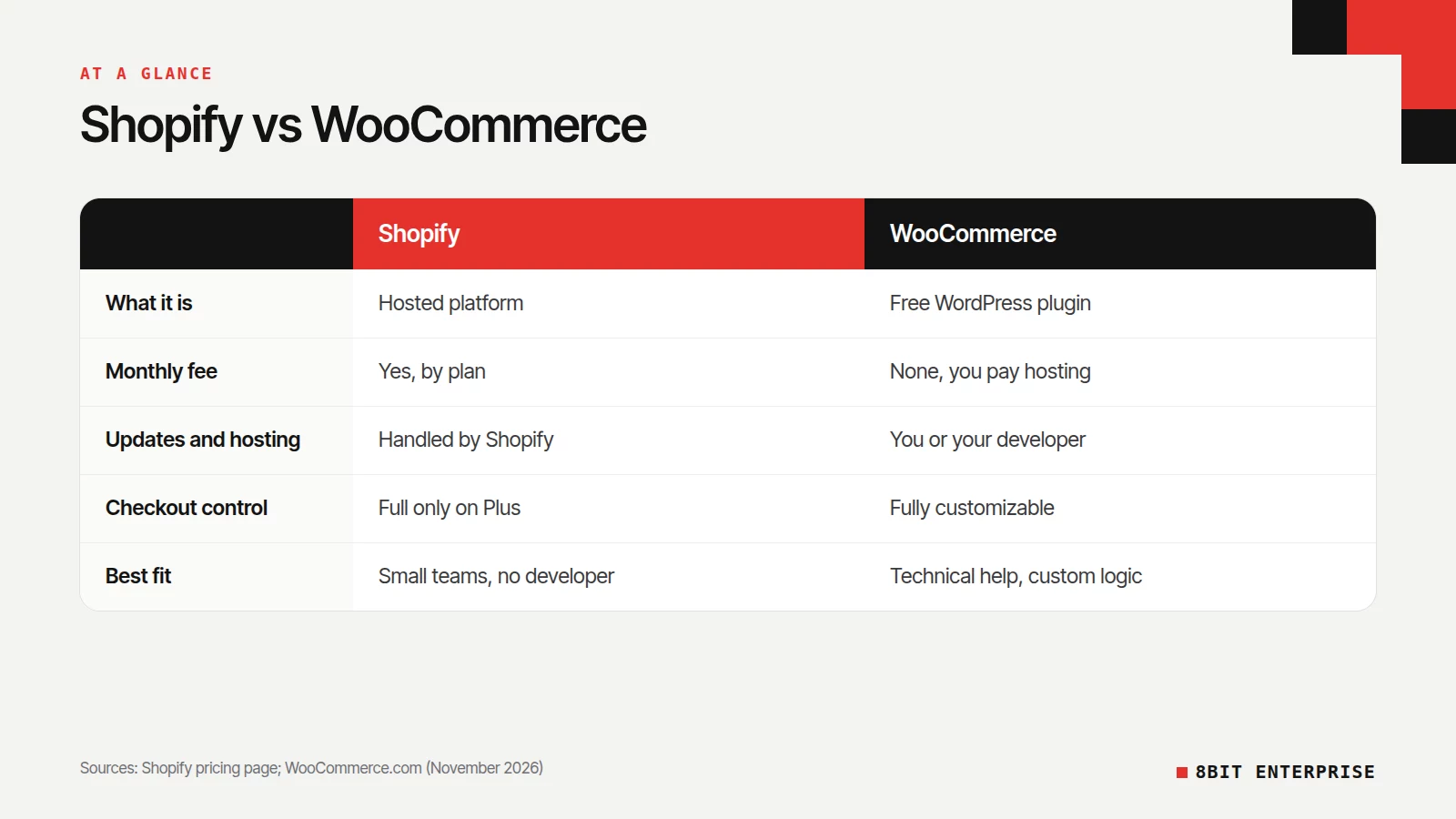
Shopify suits teams that want to sell without managing servers, while WooCommerce suits teams that want full control and have technical help. The table below compares the two on the factors that usually decide the choice. Treat it as a summary: each row gets its own section further down.
| Factor | Shopify | WooCommerce |
|---|---|---|
| What it is | Hosted ecommerce platform | Free plugin for WordPress |
| Monthly platform fee | Yes, by plan | None, but you pay for hosting |
| Hosting, security and updates | Handled by Shopify | Your responsibility, or your developer’s |
| Checkout customization | Limited, full only on Shopify Plus | Fully customizable in code |
| Best fit | Small teams that want simplicity | Teams with technical help and unusual product logic |
Popularity won’t settle it either. According to W3Techs usage statistics, WooCommerce runs on 47.3% of the ecommerce systems it detects and Shopify on 32.5%, as of 7 November 2026. Both are mainstream, well supported choices.
Shopify vs WooCommerce pros and cons
Shopify’s pros are fast setup, hosting and updates handled for you, and one support team for the whole platform. Its cons are monthly plan and app fees, extra fees for outside payment gateways, and full checkout control only on Plus.
WooCommerce’s pros are no platform fee, full ownership of your code and data, and almost unlimited customization through WordPress. Its cons are hosting you must choose and pay for, updates and backups you must manage, and more ways for a plugin conflict to break the store.
Is WooCommerce Better Than Shopify?
WooCommerce is better than Shopify when you need full control over your store’s code, data and checkout, and have someone technical to run it. Shopify is better when you’d rather pay a monthly fee and let the platform handle hosting, security and updates. Neither is better for everyone, so match the platform to your team.
WooCommerce’s own site describes it as a platform with no monthly platform fees, and that’s accurate. The software is free. But a WooCommerce store still needs hosting, a domain, an SSL certificate, and usually paid extensions for things like subscriptions or advanced shipping. Somebody also has to update WordPress, WooCommerce and every plugin, and test that nothing broke.
That upkeep is the real tradeoff. WordPress’s own documentation on updating WordPress recommends backing up your site before every update, so you can restore it if something goes wrong. On Shopify, platform updates happen without you.
When WooCommerce is the better fit
WooCommerce shines for stores with unusual product logic, such as made-to-order items with complex options, or stores where content and products need to live together on one WordPress site. If you already run a large WordPress blog, adding WooCommerce keeps everything in one place.
When Shopify is the better fit
Shopify fits teams with no developer on staff, stores that expect sudden traffic spikes, and owners who want to focus on products and marketing. You give up some control in exchange for not maintaining servers.
What Is the Disadvantage of Shopify?
The main disadvantages of Shopify are ongoing fees and limits on customization. You pay a monthly plan fee, often app subscriptions, and extra transaction fees if you use a payment provider other than Shopify Payments. Full checkout customization is reserved for Shopify Plus, so smaller plans work within Shopify’s checkout design.
Shopify’s pricing page states that third-party transaction fees may apply when you use a payment provider other than Shopify Payments, with the rate depending on your plan. The same page lists checkout customization as limited on the Basic, Grow and Advanced plans, and full on Plus.
Apps are the other downside of using Shopify that people underestimate. Many features that WooCommerce handles through free or one-off plugins come as monthly app subscriptions on Shopify. Five apps at a modest monthly fee each can rival the cost of the plan itself.
One honest note on pricing: Shopify shows plan prices based on your location, so the figure you see depends on your country. Check the pricing page from where you’ll trade rather than trusting a number in someone else’s article.
How Much Does Shopify Take From a $100 Sale?
On a $100 sale, Shopify takes a card processing fee, set as a percentage plus a small fixed amount, and that rate depends on your plan and country. If you use an outside payment provider instead of Shopify Payments, Shopify adds a transaction fee on top, and your provider charges its own processing fee too.
Here’s a worked example with an assumed rate, so you can plug in your own. If your plan’s online card rate were 2.9% plus 30 cents, a $100 sale would cost $3.20 in processing, and you’d keep $96.80 before product, shipping and tax costs. Your real rate is listed on Shopify’s pricing page for your country.
WooCommerce has no platform cut at all, but it isn’t free to take payments. Your payment provider, such as Stripe, PayPal or WooPayments, charges its own processing fee on every sale. So on a $100 sale, both platforms cost you a few dollars in card fees, and Shopify can cost more only if you add a third-party gateway.
WooCommerce vs Shopify Costs: First Year and Ongoing
Shopify vs WooCommerce pricing is hard to compare from list prices, because the total cost depends more on your apps, design work and payment choices than on the platform itself. Shopify bundles hosting into a monthly fee, while WooCommerce splits costs across hosting, extensions and maintenance time. Compare the two by filling in the same cost lines for both.
Use these lines for a fair WooCommerce vs Shopify cost comparison in 2026:
| Cost line | Shopify | WooCommerce |
|---|---|---|
| Platform or software | Monthly plan fee | Free |
| Hosting and SSL | Included in the plan | Paid hosting plan |
| Theme and design | Theme purchase or custom build | Theme purchase or custom build |
| Apps or extensions | Mostly monthly subscriptions | Mix of free, one-off and yearly licenses |
| Payment processing | Card rate, plus a fee for outside gateways | Your payment provider’s rate |
| Maintenance time | Low, platform updates are handled | Ongoing updates, backups and testing |
Fill in each line with quotes for your store, then multiply monthly figures by 12. Most owners find the platform fee is the smallest line once design, apps and staff time are included.
Shopify vs WooCommerce for SEO
Both Shopify and WooCommerce can rank well on Google, because rankings depend far more on your content, site speed and structure than on the platform. Shopify handles the basics automatically, while WooCommerce, through WordPress plugins, offers deeper control over technical settings. The right choice depends on how much SEO control your team needs.
On Shopify, the essentials come built in. Shopify’s help center confirms that all Shopify stores automatically generate a sitemap.xml file linking to products, collections, pages and blog posts, and updates it as you add items. Titles, meta descriptions and alt text are editable in the admin.
WooCommerce sits on WordPress, which gives you full access to templates, URL structures and SEO plugins such as Yoast. That control helps large catalogs with filtered navigation or complex category structures. It also means mistakes are easier to make, so technical SEO knowledge matters more.
Shopify vs WooCommerce Security, Speed and Maintenance
In a Shopify vs WooCommerce security comparison, the real difference is who does the work. Shopify runs hosting and platform updates, so your jobs are staff accounts and app choices. With WooCommerce, your host secures the server, and you or your developer keep WordPress, plugins and themes updated.
On a WooCommerce store, keeping plugins and themes current is the main routine job. Set a monthly maintenance routine: back up, update, test checkout, and check that payments still reach your account. If nobody on your team can own that routine, budget for a maintenance plan with a developer.
So how do Shopify and WooCommerce compare on security and performance day to day? Speed follows the same split. A WooCommerce store is only as fast as the hosting plan, theme and plugins behind it, so cheap shared hosting and a pile of plugins slow it down.
On Shopify, hosting is out of your hands, and the theme and installed apps decide how fast pages load. On both platforms, every extra app or plugin adds code to your pages.
On Shopify, the risks shift to access and apps. Give staff their own accounts with limited permissions, and remove apps you no longer use, since each one can access store data.
The Shopify vs WooCommerce Scorecard
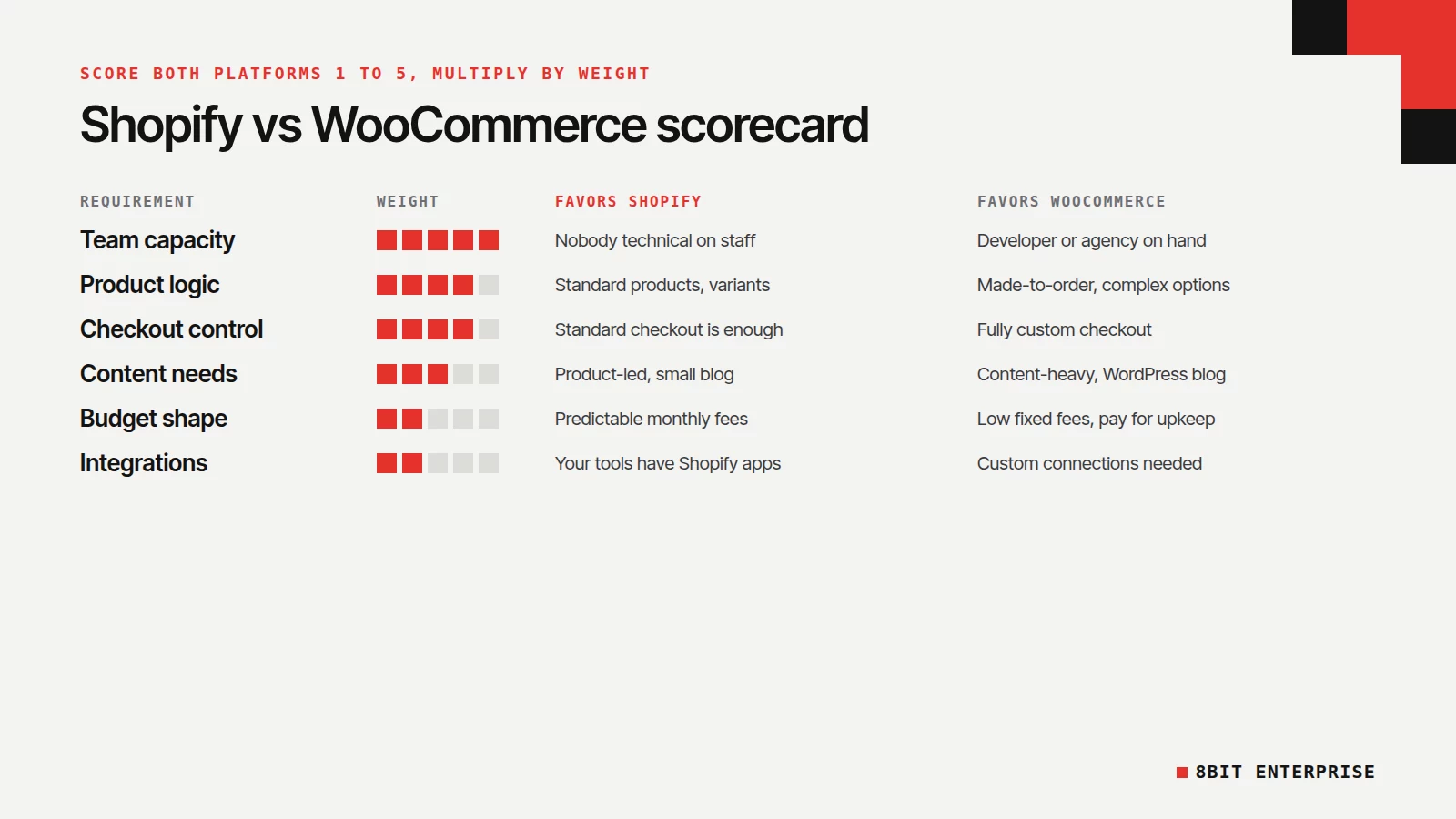
The scorecard below turns the Shopify vs WooCommerce decision into a number you can defend. Score each platform from 1 to 5 against your own store on every row, multiply by the weight, and compare the totals. With these default weights the maximum is 100, and you should adjust weights before scoring.
| Requirement | Weight | Points toward Shopify when… | Points toward WooCommerce when… |
|---|---|---|---|
| Team capacity | 5 | Nobody technical on staff | You have a developer or agency on retainer |
| Product logic | 4 | Standard products and variants | Complex options, made-to-order or unusual pricing |
| Checkout control | 4 | Shopify’s checkout is good enough | You need a fully custom checkout without Plus fees |
| Content needs | 3 | Product-led site with a small blog | Content-heavy site or existing WordPress blog |
| Budget shape | 2 | You prefer predictable monthly fees | You prefer lower fixed fees and pay for upkeep as needed |
| Integrations | 2 | Your tools have Shopify apps | Your tools need custom connections |
The platform with the higher total is your starting point, not a verdict. Read the two closest rows again and ask which one you’d regret more in two years.
Three example stores (fictional)
A two-person candle brand with 40 products and no developer scores Shopify high on team capacity and budget shape. Shopify wins clearly.
A furniture maker with made-to-order options, a 300-post WordPress blog and an in-house developer scores WooCommerce high on product logic and content. WooCommerce wins.
A growing apparel store with a part-time freelancer sits in the middle. Here the deciding row is usually checkout control. If Shopify’s standard checkout covers their needs, Shopify’s lower upkeep tips it.
Should I Switch From WooCommerce to Shopify?
Switch from WooCommerce to Shopify only if maintaining WordPress is costing you sales or staff time, and Shopify’s limits won’t block how you sell. A migration moves products, customers, orders and URLs, so plan it like a project. Don’t switch because a competitor did, or to fix a problem a better host would solve.
Good reasons to move include frequent plugin conflicts, slow pages you can’t fix on your current hosting, or a team that has outgrown hands-on maintenance. Weak reasons include a dated theme, which a redesign solves on either platform.
If you’re moving from WooCommerce to Shopify, protect your rankings. Map every old product and category URL to its new address with permanent redirects, and keep the same product titles and descriptions at launch. Google’s guidance on site moves warns that rankings can fluctuate while it processes the change, so pick a quiet sales period.
Which Is Better, Shopify or WooCommerce? Our Top Pick
For most small and mid-size stores without a developer, Shopify is the better pick, because it removes hosting and maintenance from your to-do list. WooCommerce is the better pick for content-heavy brands, stores with unusual product logic, and teams that already have technical help. Use the scorecard to confirm which group you’re in.
That’s also how our ecommerce team frames it with clients. Shopify usually wins on simple operations and room to scale without managing hosting. WooCommerce usually wins on full ownership, heavy content and unusual product logic. The scorecard simply makes that judgment visible and specific to your store.
How 8Bit Enterprise Handles This
We design and build stores on both Shopify and WooCommerce, including Shopify Plus, so our recommendation follows your catalog, your team and your running costs. The first week of a store project is planning, covering your catalog, customer journey, apps and integrations, which is when the platform decision gets made.
If you’re already on one platform and thinking of moving, our Shopify and WooCommerce store team handles store migrations too, moving products, customers and SEO rankings across. Bring your filled-in scorecard to a call, and we’ll tell you honestly if we’d choose differently.
Frequently Asked Questions
Is WooCommerce really free to use?
The WooCommerce plugin is free, and WooCommerce says it charges no monthly platform fees. Running a store still costs money, though. You’ll pay for hosting, a domain, possibly paid extensions, and payment processing on every sale. Budget for maintenance time too, since WordPress and plugins need regular updates.
Which is more popular, Shopify or WooCommerce?
WooCommerce is more widely used. W3Techs reported on 7 November 2026 that WooCommerce runs 47.3% of the ecommerce systems it detects, while Shopify runs 32.5%. Popularity doesn’t make either one right for your store, but both have large ecosystems of themes, apps and developers.
Should beginners choose WooCommerce or Shopify?
Shopify is usually easier for beginners because there’s nothing to install, host or update. You sign up, choose a theme and add products. WooCommerce needs a WordPress site and hosting first, so beginners without technical help often find Shopify faster to launch and easier to run.
Can I move from Shopify to WooCommerce later?
Yes, stores move in both directions, but plan it carefully. A move involves:
- Exporting products, customers and order history.
- Rebuilding the theme and checkout on the new platform.
- Redirecting every old URL to its new address.
- Testing payments, shipping and tax before launch.
Is Shopify or WooCommerce better for dropshipping?
For WooCommerce vs Shopify dropshipping, the deciding factor is your supplier. Most dropshipping depends on an app or extension that syncs products and sends orders to the supplier. Check which platform your chosen supplier integrates with, and what that integration costs per month, before you pick either one.
Do Shopify and WooCommerce both work with WordPress?
On the Shopify vs WooCommerce WordPress question, WooCommerce is built on WordPress, so your store and blog share one site and one admin. Shopify runs separately from WordPress. Stores that want a WordPress blog alongside Shopify usually run them as two connected sites, which means two systems to maintain and two places to manage content.
Conclusion
Shopify vs WooCommerce isn’t a contest with one winner. Shopify trades control for simplicity, and WooCommerce trades simplicity for control. Score both against your team, products and budget, then pick the one that fits how you actually work. If you’d like a second opinion on your scorecard, book a free discovery call with 8Bit Enterprise about your Shopify or WooCommerce store.