
Quick answer: An ecommerce SEO audit reviews how well search engines can crawl, index and rank your store. The hard part is reading the results, because many warnings are normal store behavior. Fix what blocks pages that earn money, ignore confirmed false alarms, and separate the issues your platform won’t let you change.
What Is an Ecommerce SEO Audit?
An ecommerce SEO audit is a review of the technical setup, content and links that decide whether your products appear in search. A general site audit stops at broken links and titles. A store audit also covers filters, variants, stock status and product data, which is where most store-specific problems hide.
Finding issues is the easy part. Any crawler will hand a mid-sized store thousands of warnings, and most store owners can’t tell which ones matter.
We read the pages ranking in the top five for this term in November 2026. One now redirects to a company homepage. The other four explain what to check, and none says which warnings are false alarms or what your platform simply won’t let you change.
This ecommerce SEO audit checklist starts there.
TL;DR
- Google says duplicate URLs, out-of-order headings and many 404s are often nothing to worry about.
- Shopify fixes the /products/ and /collections/ URL paths, so audit warnings about them can’t be solved in the admin.
- Published audit prices run from about $2,500 to $22,200 at two agencies ranking for this term.
- Rank fixes by revenue at risk per developer hour, then prove them against pages you didn’t change.
Why You Need an SEO Audit Before Spending More on Growth
An audit protects you from one expensive risk: paying for content and links that can’t work. If Google can’t reach or index your category pages, new blog posts won’t fix it. A good audit tells you whether the blocker is technical, content-related or simply a lack of authority, so your budget goes to the right problem.
Four moments justify one: a traffic drop you can’t explain, a planned platform migration, a catalog that has grown sharply, or the start of a new SEO budget. Outside those, a light monthly check is enough. Few stores need a full ecommerce site audit every quarter.
Is an SEO Audit Worth It for an Online Store?
Is an SEO audit worth it? For a store with real traffic or a catalog in the thousands, usually yes, because one template fix can affect every product page. For a new store with 40 products and almost no visitors, usually no. That store needs better pages and some authority more than a diagnosis.
Skip the audit in three situations. You have no developer time for the next 60 days, so the findings would just sit in a PDF. Search Console has already shown you the problem, so you need a fix and not a second diagnosis. Or you plan to replatform within six months, in which case most template findings will be obsolete before anyone acts on them.
How Much Does an SEO Audit Cost?
Published prices vary widely, and catalog size drives most of the difference. PixelChefs lists basic audits from around $2,500 for stores under 1,000 products. 1Digital Agency lists paid audits from $185 an hour for 40 to 120 hours, which works out to roughly $7,400 to $22,200. Both also rank for this term.
SEOProfy’s 2026 pricing guide gives a broader view, putting one-time SEO projects at about $500 to $5,000 and up to $10,000 for larger sites. Treat every figure here as a benchmark, since they all come from companies that sell SEO.
Two ecommerce SEO audits at the same price can be very different products. One is a crawl export with a logo on it. The other names the template, the cause and the fix.
Which Ecommerce SEO Audit Warnings Can You Safely Ignore?
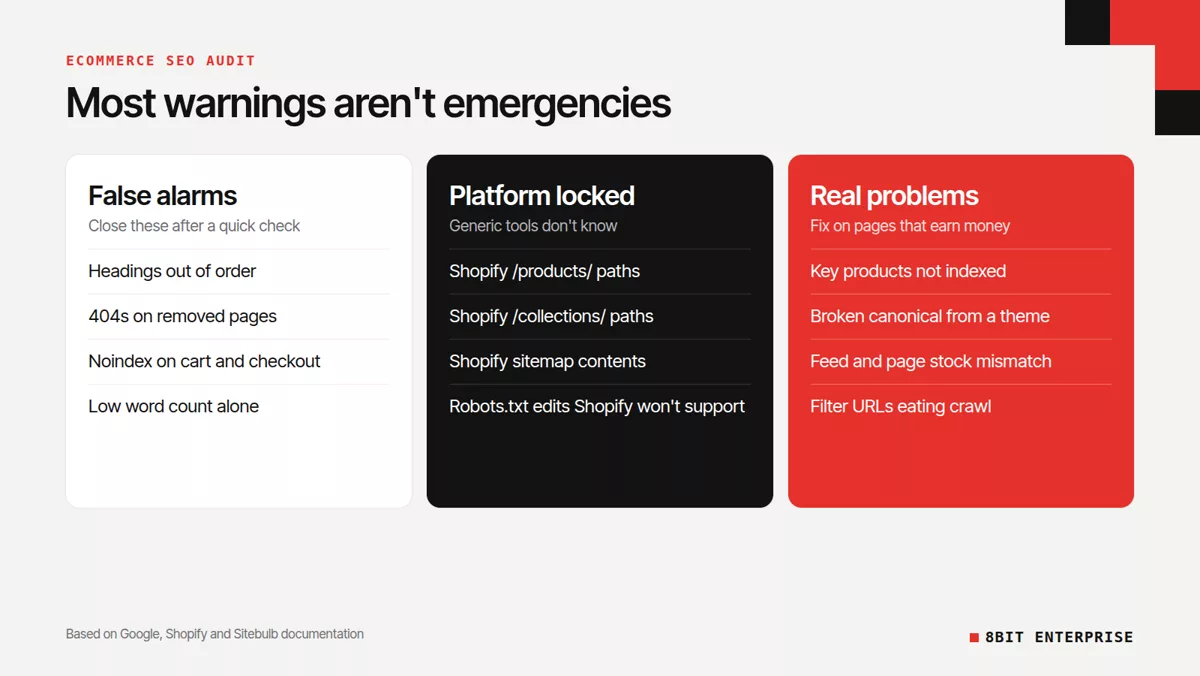
Many audit warnings describe normal store behavior, and Google’s documentation says so directly. Its SEO starter guide lists duplicate URLs, heading order and word count among the things not to focus on. Its Page indexing report help adds that a page not being indexed is not necessarily bad.
| Audit warning | What Google says | What to do |
|---|---|---|
| Duplicate content across URLs | It’s inefficient, but won’t cause a manual action | Confirm the canonical on pages that earn money |
| Pages excluded from the index | Not necessarily bad, and not every URL should be indexed | Review categories and products only |
| 404 errors | They don’t harm indexing or ranking | Fix ones you link to or submitted in a sitemap |
| Headings out of order | It doesn’t matter if they’re out of order | Ignore |
| Low word count | Length alone doesn’t matter for ranking | Judge whether the page helps a buyer |
| Core Web Vitals below a perfect score | A perfect score may not be the best use of your time | Aim for the good thresholds, not 100 |
Ignoring a warning doesn’t mean ignoring the page. Duplicate filter URLs won’t get you penalized, but they can still waste crawling, so that row is about urgency and not permission to leave them forever.
Redirect chains are a good example of a warning with a real threshold. Google can follow up to 10 hops but advises keeping chains short, ideally three or fewer. A two-hop chain on an old blog post isn’t worth a developer’s afternoon.
What Can’t Your Store Platform Let You Fix?
Your platform decides which audit findings are fixable at all, and generic tools don’t know the difference. Shopify locks parts of your URLs and sitemap, so some warnings have no practical fix. WooCommerce gives you full control, which means more of its problems are yours to create. Sort findings by platform before you assign anyone.
Shopify audit findings that are normal or locked
Shopify adds /products/ and /collections/ to your URLs, and you can only edit the handle after them, according to Sitebulb’s guide to auditing Shopify. A crawler may flag those paths as a problem. Paying someone to remove them isn’t an option without moving to a headless build.
Products in a collection also get a second URL, such as /collections/mens-watches/products/example, with a canonical pointing to /products/example. Tools often report this as duplication. Check the rendered canonical on a few products, because themes and apps can break it. If it’s correct, close the ticket.
Be careful with one common recommendation. You can edit robots rules through a robots.txt.liquid template, but Shopify calls this an unsupported customization, says its support team can’t help with it, and warns that incorrect use can result in loss of all traffic. Sitebulb’s guide also notes that you can’t modify the sitemap directly.
WooCommerce audit findings that are normal or self-inflicted
WooCommerce marks cart, checkout and account pages as noindex on purpose, so an audit flagging them is reporting correct behavior. The real issue appears when an SEO plugin lists those pages in your sitemap, which support threads show can trigger Search Console errors. Remove them from the sitemap and move on.
WooCommerce’s bigger risk is URLs that multiply, including ?orderby=, ?filter_ and ?add-to-cart= links. Decide what crawlers may reach. One trap: if you block a page in robots.txt, Google can’t see a noindex tag on that page.
How to Audit an Ecommerce Website Step by Step
Auditing an online store is mainly a question of order: check indexing first, then crawling, then templates, then content. Each stage depends on the one before it. Rewriting product descriptions is wasted effort if Google isn’t indexing those pages, so work through this list from top to bottom and stop to fix blockers.
Knowing how to conduct an effective ecommerce SEO audit mostly means resisting the urge to start with whatever a tool flags in red.
Technical SEO Audit Checklist for Store Pages
This technical SEO audit checklist needs Google Search Console and a crawler. The free version of Screaming Frog handles up to 500 URLs per crawl, which suits small catalogs, though filters can use that up quickly.
- Test your money pages. Run your top 20 revenue pages through the URL Inspection tool and confirm that each one is indexed.
- Read exclusions by page type. In the Page indexing report, look only at categories and products.
- Crawl the site. Find broken internal links and pages more than three or four clicks from the homepage.
- Review filter URLs. Google warns that crawlers can spend time on a very large number of faceted navigation URLs before recognizing they’re useless. First check which filtered pages earn traffic.
- Check variants. Google says each variant should be identifiable by its own URL, with the canonical product URL on every variant page.
- Find empty categories. Google recommends a noindex tag for a category with no products.
- Measure speed. Google’s good thresholds are LCP within 2.5 seconds, INP of 200 milliseconds or less and CLS of 0.1 or less.
Ecommerce Website Audit Checklist for Products and Content
This ecommerce website audit checklist covers what a crawler can’t judge, so it needs a person looking at real pages.
- Match availability everywhere. Google Merchant Center requires your feed, landing page, structured data and checkout to agree, and a mismatch in availability triggers a product disapproval.
- Validate product schema. Confirm that price, availability and reviews match the page.
- Look for duplicate descriptions. Manufacturer copy reused across many stores gives Google little reason to choose your page.
- Check category pages. Each one should target a clear search term and answer a buyer’s questions.
- Spot cannibalization. Two pages chasing the same term can hold each other back.
- Review your links. Compare your backlink profile against the stores that outrank you.
An SEO technical audit checklist alone will miss most of this second list.
How Do You Rank What an Ecommerce SEO Site Audit Finds?
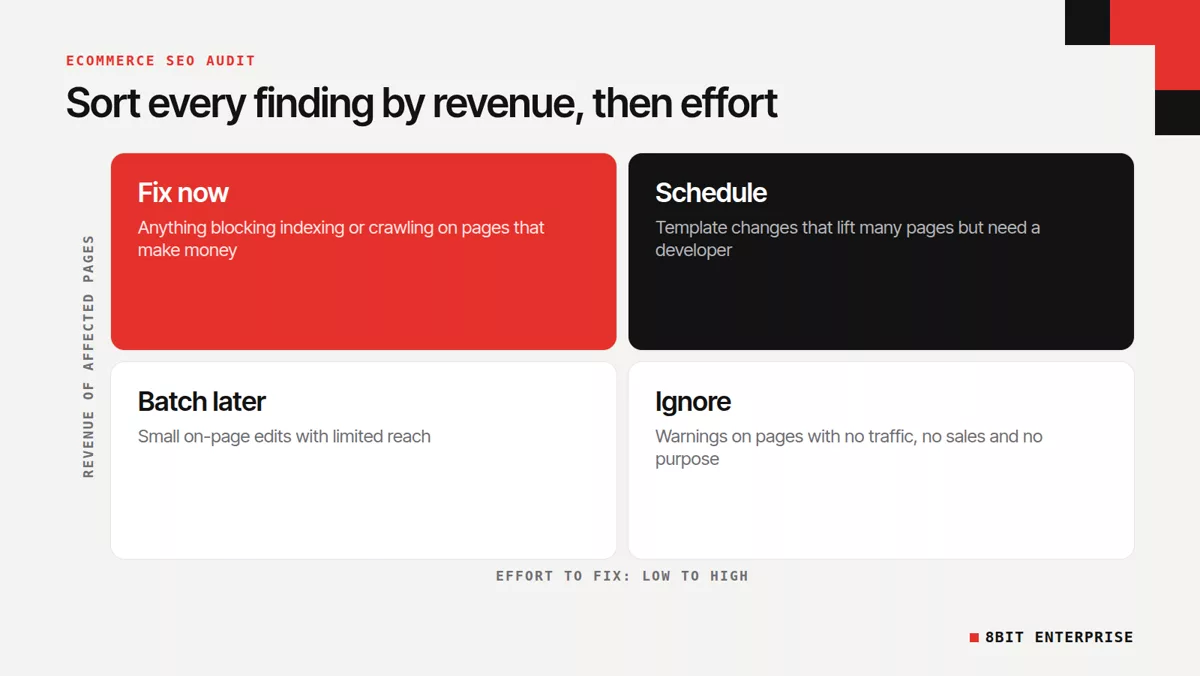
An ecommerce SEO site audit is only useful once its findings are ranked by money. Two agencies ranking for this term promise revenue-based priorities, but neither publishes how it works. Here’s a simple version: take monthly organic revenue on affected pages, multiply by your estimated recovery, then divide by developer hours needed.
The numbers below are invented to show the math. Pull your real organic revenue by landing page from Google Analytics.
- Canonical bug on a product template: $6,000 a month, 20% estimated recovery, 4 hours. That’s $300 per hour.
- Slow category template: $20,000 a month, 10% estimated recovery, 8 hours. That’s $250 per hour.
- Missing alt text on unsold products: $0 a month. That’s $0 per hour, however many warnings it creates.
Your recovery percentage will be a guess, and that’s fine. The formula’s job is to stop a long list of cheap warnings from outranking one expensive problem.
How Do You Prove the Audit Fixes Worked?
Prove a fix by comparing the pages you changed against similar pages you didn’t. Log the date of every release, then compare clicks and organic revenue for both groups over the same period. If both rose together, the cause was probably seasonal demand or a market shift, and your fix may have done very little.
Save a baseline before anything changes: indexed pages, clicks and organic revenue by page type. Then allow time for Google to recrawl the affected pages before you judge the result. Without a control group, every good month looks like a win.
Free Ecommerce SEO Audit vs Paid Ecommerce SEO Audit Services
A free ecommerce SEO audit finds symptoms, and a paid review should explain causes. Search Console and a basic crawler will show you what’s broken, but they can’t connect a problem to your revenue or tell which warnings are harmless on your platform. Paid ecommerce SEO audit services earn their fee only when they do both.
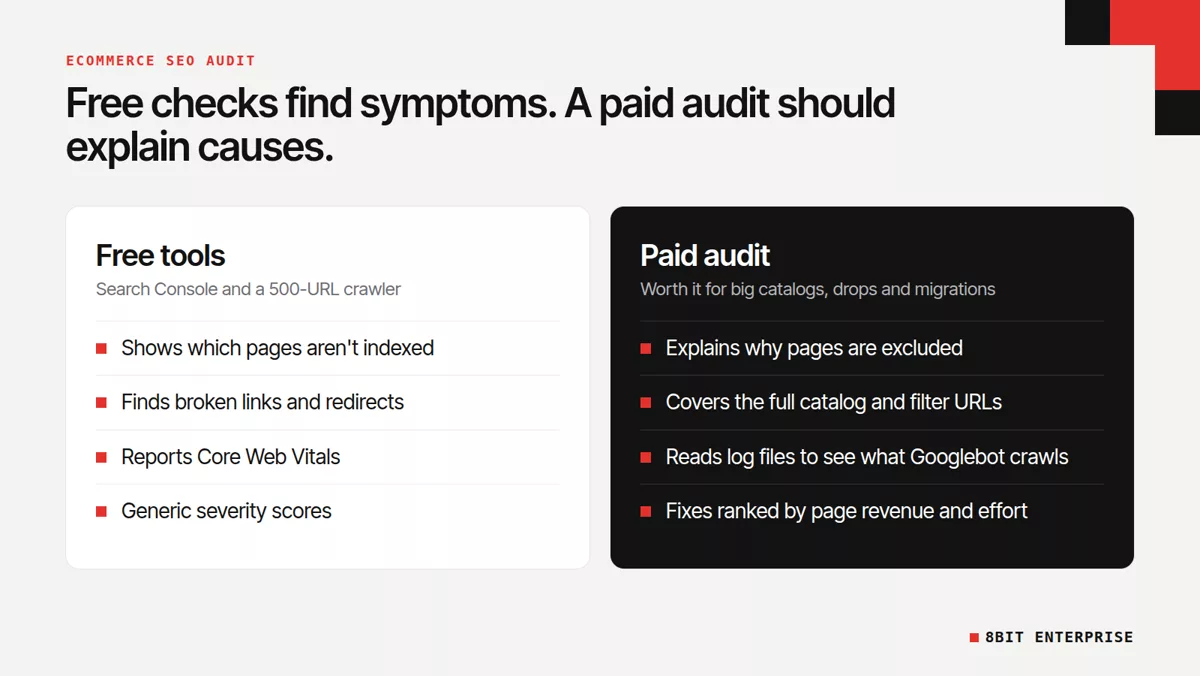
An ecommerce technical SEO audit is where paying tends to help most, because log files, filter rules and template fixes take experience. Content checks are easier to keep in-house if someone already knows your customers. Our guide to in-house and outsourced SEO can help you split that work.
Common Mistakes to Avoid With an Ecommerce SEO Audit
The most common ecommerce SEO audit mistake is treating the tool’s score as the goal. A health score of 95 doesn’t sell anything. Other frequent errors include auditing every page evenly, skipping the product feed, and starting without a baseline, which leaves you with no way to prove the fixes worked.
Blanket fixes cause damage too. Blocking every filter URL can remove a page that ranks for a valuable color and product combination.
An SEO audit for ecommerce site owners can also arrive bundled with a pitch for a follow-up retainer. A second opinion on the biggest finding is cheap insurance.
How to Choose Who Runs Your Ecommerce Website SEO Audit
Choose whoever can tell you which findings don’t matter. A useful ecommerce website SEO audit names the template, the cause, the fix and the expected effect, and it dismisses false alarms in writing. Ask for a redacted sample before paying, then ask which common warnings they’d ignore on your platform.
Also ask whether they review log files, whether they check the Merchant Center feed against the site, and who does the fixes.
Our ecommerce SEO agency scorecard goes deeper if you’re comparing providers. If you’d rather have one team find and fix the issues, our SEO service covers audits and implementation together.
Frequently Asked Questions
What is an SEO audit, and how is an ecommerce one different?
An SEO audit is a review of the technical, content and link factors that affect search visibility. An ecommerce version adds store-specific checks, including filter URLs, product variants, stock status, product schema and Merchant Center feeds. Those areas create most of the crawling and duplication problems that online stores face.
Which SEO audit warnings can I ignore on my store?
Google’s documentation says heading order, word count alone and some duplicate URLs shouldn’t be your focus. Common examples include:
- Headings out of order
- 404s on pages you removed deliberately
- Noindex on cart and checkout pages
- Shopify’s collection-path product URLs with a correct canonical
How long does an ecommerce site audit take?
Catalog size sets the timeline for an ecommerce site audit. A store under 500 URLs fits in a single free Screaming Frog crawl, while stores with thousands of products take longer, because filter rules, templates and log files need individual review. 1Digital Agency quotes 40 to 120 hours for its paid audit.
Can I do an ecommerce SEO audit for free?
Google Search Console, PageSpeed Insights and the free Screaming Frog tier cover a solid first pass at no cost. The free crawler stops at 500 URLs, so larger catalogs will need a paid license. You’ll still have to set priorities yourself, because free tools can’t see your revenue.
How often should an online store run an SEO audit?
Run a full audit about once a year, or before a migration or redesign. Trigger one early after an unexplained traffic drop or a large catalog expansion. Between full audits, a monthly look at the Page indexing report in Search Console catches most serious problems before they cost you sales.
Does an SEO audit improve rankings on its own?
No audit improves rankings on its own, because it only diagnoses problems. Rankings can change after the fixes go live and Google recrawls the affected pages. That’s why developer availability matters before you buy one, and why you should record a baseline first so you can measure the result.
Conclusion
An ecommerce SEO audit pays off when it tells you what to leave alone. Start free, dismiss the false alarms, separate what your platform locks, and rank the rest by revenue at risk. If what remains points to templates or logs, that’s when outside help makes sense.