
Quick answer: Ecommerce schema is code on your product pages that tells Google the product’s name, price, stock and policies in a format it can read reliably. Shopify and WooCommerce already add the basics. What the default Shopify themes we tested leave out is shipping and return information, which you can now add in Search Console without touching code.
What Is Ecommerce Schema?
Ecommerce schema is structured data, written in the schema.org vocabulary, that describes your store and products to search engines. Google uses it to understand a page and to decide whether it can show richer results, such as price, stock status, shipping cost or review stars. Google recommends the JSON-LD format, a small script block in the page.
You’ll also hear it called schema markup for ecommerce or structured data for ecommerce. They mean the same thing. If you’re new to the idea, our plain-English guide to schema markup covers the basics.
Most of the top-ranking guides we read stop at “add Product schema.” That’s not much help if you run Shopify or WooCommerce, because your platform already adds some of it. The useful questions are what’s already there, what’s missing, and which missing pieces are worth fixing. We tested that for this guide.
TL;DR
- Shopify’s Dawn and Horizon demo stores output product name, price, currency, stock and variants, but no shipping or return policy markup (our test, 13 November 2026).
- Google stopped showing FAQ rich results on 7 May 2026, so FAQ markup no longer earns extra space in results.
- Since 12 November 2025, any store Google identifies as an online merchant can set shipping and returns in Search Console, and those settings take precedence over on-page markup.
- One complete Product block per page beats two competing ones from your theme and an app.
What Does Ecommerce Schema Do for an Online Store?
Product structured data makes your listing eligible for two kinds of Google results. Product snippets are for pages where people can’t buy directly, such as review sites. Merchant listings are for pages where customers can buy from you, and they can show extra details like shipping and return information. If you sell online, merchant listings are the target.
For merchant listings, Google’s merchant listing documentation lists three required Product properties: name, image and offers. The Offer needs a price above zero and a currency. Everything else, including brand, GTIN, availability, shipping and returns, is recommended.
Eligibility isn’t a guarantee. Google’s structured data introduction says markup can make results more engaging, but pages that miss requirements or guidelines “might be ineligible.” Google also publishes case studies there: Rotten Tomatoes measured a 25% higher click-through rate on 100,000 pages with structured data, and Nestlé found that pages shown as rich results had an 82% higher click-through rate. Those are Google’s numbers from large sites, not a promise for a small store.
What Changed in 2026?
Three changes in Google’s rules make many ecommerce schema guides out of date: FAQ rich results disappeared, product category and sale dates got documented, and shipping and returns moved into Search Console. We checked each against Google’s Search Central changelog, and several pages ranking for this topic still miss all three.
FAQ rich results are gone
Google added a deprecation notice to its FAQ documentation on 8 May 2026, saying the feature would no longer appear in Google Search starting 7 May 2026. It removed the FAQ documentation on 15 June 2026. Several ranking guides still recommend FAQ schema for extra space in results, but that benefit no longer exists. Our guide to FAQ schema in 2026 covers when to keep or remove the markup.
HowTo rich results went earlier, in September 2023, according to Google’s announcement on its Search Central blog.
Product category and sale dates are documented
On 7 July 2026, Google documented two merchant listing details. Product.category can now use plain text or a Google product category code. A new “Sale duration” section explains using validFrom with validThrough or priceValidUntil to set when a sale price starts and ends.
Shipping and returns can live outside your code
On 12 November 2025, Google expanded Search Console’s shipping and returns settings to all websites it identifies as online merchants, without needing a Merchant Center account. Google states that “settings configured in Search Console will take precedence over structured data on your site.” The same update introduced organization-level shipping policy markup, so one site-wide policy can replace markup on every product.
What Does Shopify Structured Data Include by Default?
We loaded a product page on Shopify’s official Dawn and Horizon theme demo stores on 13 November 2026 and read every JSON-LD block. Both output an Organization block and a ProductGroup with each variant as its own Product and Offer. That variant structure is good, and none of the five top-ranking guides we read mentions it.
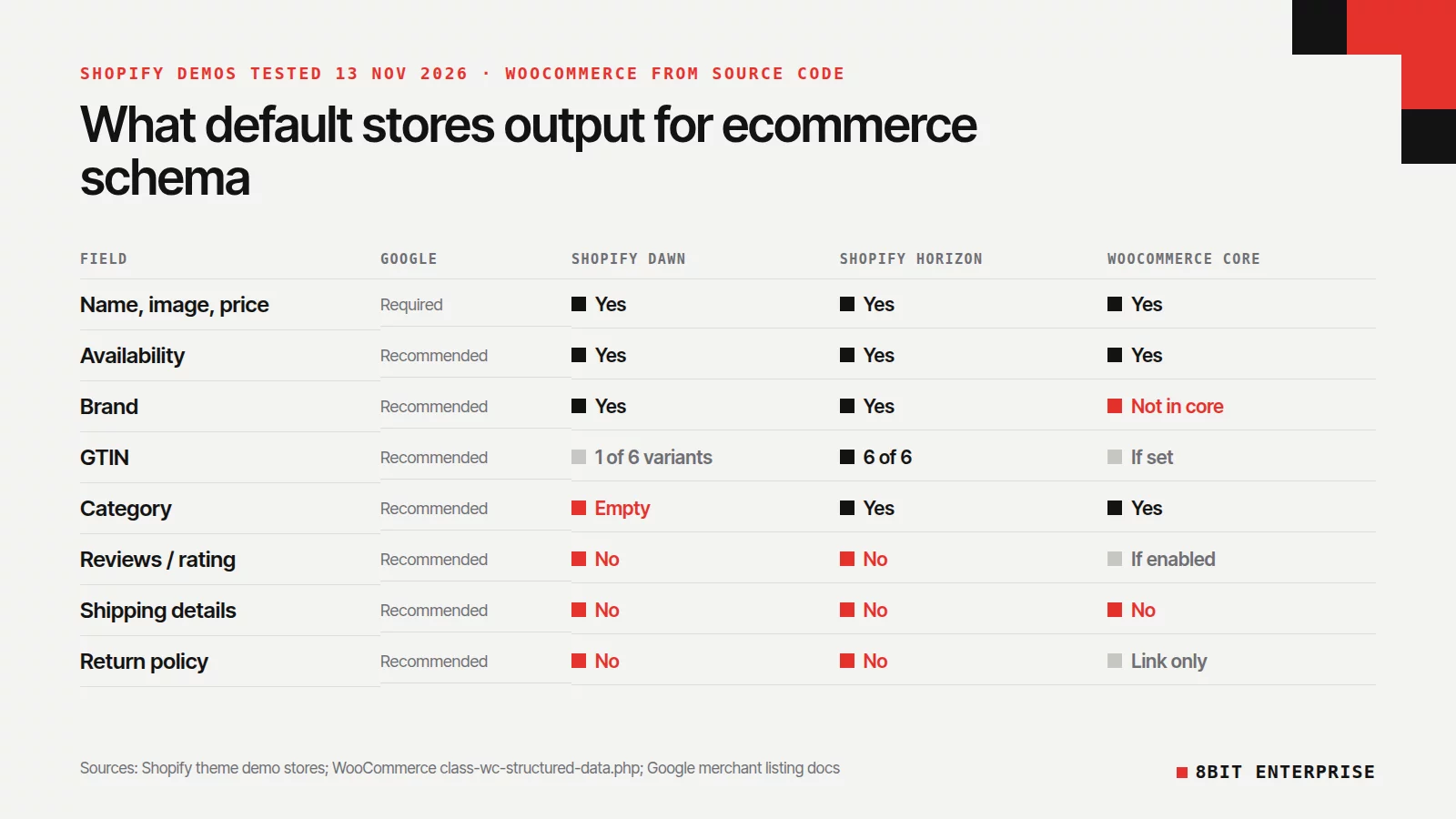
Here’s what we found, field by field. These fields decide which Shopify rich snippets, such as price, stock and shipping, Google can show:
| Field | Google’s status | Dawn demo | Horizon demo | WooCommerce core |
|---|---|---|---|---|
| name, image, price, currency | Required | Yes | Yes | Yes |
| availability | Recommended | Yes | Yes | Yes |
| brand | Recommended | Yes | Yes | Not in core code |
| GTIN | Recommended | 1 of 6 variants | 6 of 6 variants | If valid GTIN set |
| category | Recommended | Empty value | “Pants” | Yes |
| reviews and rating | Recommended | No | No | Yes, if reviews enabled |
| sale dates (priceValidUntil etc.) | Recommended | No | No | priceValidUntil |
| shippingDetails | Recommended | No | No | No |
| return policy | Recommended | No | No | Link to returns page |
The Shopify columns are our test of two demo products. Your store may differ if your theme has been edited or an app adds markup. The WooCommerce column comes from WooCommerce’s own structured data source code on GitHub.
Two things stand out. Neither Shopify demo includes shipping or return policy markup, which is why so many Shopify owners get Search Console warnings. And Dawn outputs "category": "", an empty value. Check that your own product category is filled in your Shopify admin.
What about WooCommerce structured data?
WooCommerce core adds a Product block with name, description, image, SKU, price, currency, stock status and a priceValidUntil date. It includes up to five reviews and a rating when product reviews are on. For returns, it adds a separate OnlineStore block that links to your refund and returns page. We didn’t find brand or shippingDetails in the core code, so SEO plugins often fill those gaps.
How Do You Fix “Missing Field shippingDetails” and “hasMerchantReturnPolicy”?
These two Search Console warnings come up again and again in Shopify Community threads. They’re warnings about recommended fields, not errors, so your products can still appear. Fixing them gives Google the shipping and return details it can show in merchant listings.
You have three options, from easiest to most work:
- Set them in Search Console. Go to Settings, then Shopping, then Shipping and returns. Enter your shipping rates and delivery times, and your return window, cost and policy link for each country you ship to. Google’s Search Console help page says shipping details are approved automatically, while return policies are reviewed by hand and can take 10 to 13 days.
- Use Merchant Center. If you already sync products through the Google & YouTube app, set shipping and returns in Merchant Center. Google ranks Merchant Center and Search Console settings above any markup on your site.
- Add organization-level markup. Put one return policy, and one shipping policy, under your Organization schema instead of on every product.
For option 3, a site-wide return policy looks like this. Google’s return policy documentation requires applicableCountry and returnPolicyCategory, plus merchantReturnDays for a fixed return window:
{
  "@context": "https://schema.org",
  "@type": "Organization",
  "name": "Your Store",
  "url": "https://www.example.com",
  "hasMerchantReturnPolicy": {
    "@type": "MerchantReturnPolicy",
    "applicableCountry": "US",
    "returnPolicyCategory": "https://schema.org/MerchantReturnFiniteReturnWindow",
    "merchantReturnDays": 30,
    "returnFees": "https://schema.org/FreeReturn"
  }
}
Change the country, days and fees to match your real policy. Our free schema markup generator can build this Organization block for you, with the return policy included. Markup that promises free 30-day returns when you charge for returns breaks Google’s rule that markup must match what shoppers see.
Search Console doesn’t read your Merchant Center settings, according to several Shopify Community threads, so the warning email may keep arriving even when Google already has your policies. If your policies are set in Merchant Center or Search Console, the warning matters less than it looks.
How to Add or Improve Ecommerce Schema on Your Store
You may not need a developer. Shopify and WooCommerce already output the core Product data, so the work is checking what’s there, removing duplicates and filling in missing details. Follow these steps in order. Many stores can stop after the first four.
- See what you already have. Paste a product URL into Google’s Rich Results Test. It shows which Product, merchant listing and breadcrumb items Google detects.
- Look for duplicates. If the test shows two Product items, your theme and an app are both adding markup. Keep the more complete one and switch the other off. Shopify Community threads report duplicates from review and SEO apps on Dawn-based themes.
- Fill the data, not just the code. Add GTINs, brand and product category in your Shopify or WooCommerce admin, since product structured data is only as good as the product data behind it. Your theme can only output what you’ve entered.
- Set shipping and returns in Search Console or Merchant Center, as covered above.
- Add sale dates if you run sales. Use
validFromandvalidThroughso Google knows when a sale price ends. On Shopify this may need a developer or a schema app, which is one reason to fix duplicates first. To write the code yourself, our free Product Schema Generator adds sale dates, shipping and returns, and flags anything Google needs. - Check the syntax. A schema markup validator, such as validator.schema.org, checks that your JSON-LD is valid. It doesn’t tell you whether Google will show a rich result, so use it alongside the Rich Results Test.
- Watch Search Console. The Merchant listings and Product snippets reports show errors and warnings across all products after Google recrawls them.
Generators and schema apps can save time, but they can also create the duplicate problem in step 2. Check the output before you install one.
Common Ecommerce Schema Mistakes to Avoid
Many of the ecommerce schema problems raised in Shopify Community threads aren’t missing code. They’re conflicts and stale data: two blocks describing the same product, prices that no longer match the page, or markup claiming things the page doesn’t show. Watch for these five.
Two Product blocks on one page. Shopify Community threads report it often. It splits your data and can trigger conflicting warnings.
Hard-coded prices. Markup typed in by hand goes stale the first time you change a price. Google’s structured data guidelines say markup must match what’s visible on the page, so keep prices coming from your product data.
Adding FAQ markup for rich results. It no longer earns a rich result in Google Search. Good FAQ content can still help readers, but don’t expect extra space in results.
Marking up reviews you didn’t earn. Google added a guideline on fake and undisclosed incentivized reviews in July 2026. Only mark up genuine customer reviews that appear on the page.
Leaving the category empty. If your theme outputs an empty category, as Dawn’s demo does, fill in the product category in your admin.
Is Ecommerce Schema Worth It for a Small Store?
Yes, mostly because the work is small. Shopify and WooCommerce already handle the required fields. For a store on either platform, the remaining work is filling in brand, GTIN and category, removing duplicate markup, and setting shipping and returns in Search Console.
It’s not a ranking shortcut. Google describes structured data as a way to understand and display your page, and it doesn’t guarantee rich results. Think of it as making sure the price, stock and delivery details Google shows are correct and complete.
If your store needs a wider check, our ecommerce SEO audit checklist covers structured data alongside crawling, speed and duplicate pages.
Frequently Asked Questions
What is ecommerce schema markup?
Ecommerce schema markup is structured data that describes your products, prices, stock and store policies to search engines. Google recommends adding it as a JSON-LD script on each product page. Google uses it to understand the page and to decide whether to show product details, such as price and shipping, in search results.
Does Shopify add schema markup automatically?
Yes. Shopify’s Dawn and Horizon demo stores both output Product data, including name, price, currency, stock and each variant, in our 13 November 2026 test. Neither included shipping or return policy markup. Brand, GTIN and category depend on what you enter in your Shopify admin.
Why does Search Console say “Missing field shippingDetails”?
Search Console flags shippingDetails, and often the missing field hasMerchantReturnPolicy too, because both are recommended merchant listing fields that many store themes don’t output. It’s a warning, not an error. You can fix it by setting shipping in Search Console or Merchant Center, or by adding organization-level shipping markup to your site.
Do FAQ rich results still work for online stores?
No. Google stopped showing FAQ rich results in Google Search starting 7 May 2026 and removed the documentation on 15 June 2026. FAQ markup won’t give your store extra space in search results. Helpful FAQ content on the page can still answer shoppers’ questions.
What ecommerce schema types does a store need?
These four types cover the basics for an online store:
- Product and Offer on every product page
- Organization, ideally with return and shipping policies
- BreadcrumbList for category paths
- Review and AggregateRating, only for genuine reviews shown on the page
Conclusion
Ecommerce schema isn’t something a Shopify or WooCommerce store needs to build from scratch in 2026. Shopify and WooCommerce already add the core product data. Your job is to fill the gaps: complete product data, a single clean Product block, and shipping and return policies in Search Console. If you’d like us to check and fix it for you, our SEO team can audit your store’s structured data.